OWC Express 4M2 enclosure offers an alternative route to large, fast external storage
Thunderbolt 3 on Windows cripples performance to well below the advertised maximum speed
OWC Express 4M2 SSD slots are PCIe 4.0 x1 only, so individual drive speeds are limited
In a market saturated with expensive high-capacity storage, the OWC Express 4M2 enclosure offers an alternative route to large, fast external storage without immediately breaching the $3000 mark.
At $239.99 for the base configuration, this device cheaper than the TerraMaster D4 SSD and offers a flexible foundation for building what could amount to a 32TB setup when paired with four 8TB NVMe drives.
The company promotes this device as capable of up to 3200MB/s throughput, but real-world performance is highly variable.
Maximum speed requires RAID and careful system configuration
The four M.2 NVMe slots support only PCIe 4.0 x1, which limits individual drive performance to about 1600MB/s.
Reaching peak speeds, therefore, requires RAID configurations and optimal conditions, factors that introduce complexity.
It provides support for RAID 0, 1, 4, 5, and 10, but again, achieving these benefits depends on software licensing, drive quality, and user knowledge.
Users might be drawn by the enclosure’s speed, but should be aware that performance gains require effort and understanding.
Compatibility with USB4 and Thunderbolt standards across macOS and Windows gives the enclosure broad appeal, although actual speed will be gated by the host device.
For example, systems running on older Thunderbolt 3 ports under Windows are capped well below full bandwidth.
While macOS users gain extra features such as booting from RAID arrays, this is limited to systems running at least macOS 11.3.
The Express 4M2 does deliver in terms of construction and thermal management.
Its aircraft-grade aluminum chassis is paired with a dual-fan system that activates only under high thermal load, which ensures quiet operation in most scenarios.
OWC's inclusion of SoftRAID on some models introduces functionality typically reserved for more expensive storage systems.
For those trying to assemble a portable SSD setup or replace their external HDD with something faster, this enclosure makes economic sense, but only just.
However, the cost of filling all four bays with quality 8TB SSDs still pushes the total towards $3000, making this option practical only for those who can supply their own drives or already have SSDs on hand.
Rumors that Apple might make an affordable, multi-colored MacBook based on the A18 Pro chip sparked considerable excitement and ignited a hope in me and others that it could mark the return of the 12-inch MacBook.
Unveiled a decade ago, the gold-finished 2-lb, full-sized keyboard-sporting MacBook was, for its time, an engineering marvel. Apple arguably rewrote its laptop playbook to create the system.
Shortly after launch, I spoke to the marketing head Phil Schiller and Apple's Mac and iPad lead (and now Apple's senior vice president of Hardware Engineering) John Ternus about all Apple did to make the portable wonder.
The pair spread out before me things like a multi-tiered battery and something called the "speaktenna", which was basically a combination of Wi-Fi and Bluetooth antennas and a speaker system.
"We ended up with a group of antenna engineers who know more about speakers than any other antenna engineers and a group of speaker engineers who knew more about antenna design than just about anyone else in the world," Ternus told me.
There was a passion around the product that rivaled that of the Apple Watch, which launched alongside it.
The 12-inch MacBook was also a bit of an odd duck. It was lighter than a MacBook Air, but it was not an Air. It didn't have the same number of ports. In fact, there was just one USB-C port running at USB 3.1 speeds (pokey compared to the Thunderbolt 4 ones you find on today's MacBook airs). Oh, and did I mention that the port handled charging duties, too?
Encrusted with components on both sides, the 12-inch MacBook's motherboard was small enough to fit in the palm of my hand. Everything about the MacBook's components was built in support of its enviable proportions.
At its thickest part, it was, at 0.35cm, thinner than the current MacBook Air. I love the current 13-inch MacBook Air (M4), but I'd be lying if I said I wouldn't enjoy carrying around an even lighter, thinner, and smaller cousin.
It's fair, though, to ask why the market needs such a system now.
First, let's imagine what the MacBook 12-inch 2026 might be. It would have:
An A18 Pro CPU
13-inch LED-backlit Retina display
16 GB of memory to support Apple Intelligence
128 GB of on-board storage
30GB of free iCloud storage
A fanless design
A MagSafe Charge port
A USB-C style Thunderbolt 3 port
Recycled aluminum enclosure
A full-sized magic keyboard including Touch ID
A 4-inch Force Touch Trackpad
Design-wise, the 12-inch MacBook A18 Pro would align closely with the MacBook Air line. No more wedge, instead two flat panels squeezed together into a 0.35cm-thick slab.
Granted that everything above is guesswork, but I believe that configuration would fit neatly into a $599 package (maybe even a $499 one).
Nothing here is new, and the A18 Pro is plenty powerful and efficient to run such a system.
The benefit, obviously, is an affordable, yet nearly full-sized portable that is a complete system. I am well aware you can buy an M4 Mac Mini for $599, but you still need to buy a mouse, keyboard, and screen. This, by contrast, would be the full Apple MacBook package at, finally, an affordable price.
You might have also noticed the rather paltry base storage. That's to help keep costs down. It's buttressed, though, by something Apple desperately needs to do: offer more versatile and forgiving iCloud storage options.
The usual 5GB of free storage is not enough, and I think the extra 30GB will offset the limited local storage, moving those who are on the fence about the 12-inch MacBook into the must-buy territory.
Give them what they want
If Apple balks at reintroducing the confusing "MacBook" name, especially when it's smaller and lighter than the MacBook Air, they could call it the MacBook Air LT (for light) or MacBook Air A (for its A-series chip).
One need only look at Walmart for evidence that consumers want such a system. It's been selling the old-school design MacBook Air M1 for $699 and now $649 for years. People are desperate for a truly affordable Mac, but they are probably tired of the growing performance compromises tied to the aging M1 chip.
The A18 Pro will sing in a tiny 12-inch laptop, and the system's incredibly small proportions will make it a hit with those who thought they might go for a lightweight iPad with a Magic Keyboard Folio, mainly because they thought it wouldn't weigh down their backpack.
Apple has learned, thanks to Apple Silicon, so much about building lightweight and performant systems that it makes sense to extend the MacBook idea in new and maybe unexpected directions.
A revived 12-inch MacBook would sell like hotcakes and pave the way for more fresh ideas, like a 12-inch MacBook Air running an M3 chip. That one could sell for $699.
Security researchers found three medium-severity flaws in Bluetooth SoCs
When chained, they can be used to eavesdrop on conversations, and more
Patches are being developed, so be on your guard
Security researchers have uncovered three vulnerabilities in a Bluetooth chipset present in dozens of devices from multiple manufacturers.
The vulnerabilities, they say, can be exploited to eavesdrop on people’s conversations, steal call history and contacts information, and possibly even deploy malware on vulnerable devices.
However, exploiting the flaws for these purposes is quite difficult, so practical implementation of the bugs remains rather debatable.
Wipe your personal data off the internet with the Incogni data removal service. Stop identity thieves
and protect your privacy from unwanted spam and scam calls.View Deal
Difficult to pull off
Security researchers ERNW recently found three flaws in the Airoha system on a chip (SoC), apparently “widely used” in True Wireless Stereo (TWS) earbuds.
The SoC is allegedly present in 29 devices from different manufacturers, including a couple of high-profile names: Beyerdynamic, Bose, Sony, Marshall, Jabra, JBL, Jlab, EarisMax, MoerLabs, and Teufel. Speakers, earbuds, headphones, and wireless microphones all seem to be affected.
The bugs are now tracked under these CVEs:
CVE-2025-20700 (6.7/10) - missing authentication for GATT services
CVE-2025-20701 (6.7/10) - missing authentication for Bluetooth BR/EDR
CVE-2025-20702 (7.5/10) - critical capabilities of a custom protocol
The researchers said that a threat actor with a rather high technical skill set could, if they are within Bluetooth range, pull off an attack and hijack the connection between the phone and the Bluetooth device.
They could then issue different commands to the phone, including initiating or receiving calls, or retrieving the phone’s call history and contacts.
They could also “successfully eavesdrop on conversations or sounds within earshot of the phone," they said. Ultimately, they said it was possible to rewrite the device’s firmware and thus deploy different malware variants.
But the attacks are difficult to pull off, which could mean that only advanced adversaries, such as state-sponsored threat actors, might try to abuse the flaws. In any case, Airoha released an updated SDK with a set of mitigations, which the manufacturers now started turning into patches.
I wouldn't call myself a flashy person, but when it comes to smart lighting, I'm prepared to go all-out. In my home, I'm using everything from standing lamps like Philips Hue's Signe gradient lamp and TV backlight to the Govee Table Lamp 2 to give my home lighting some pizzazz.
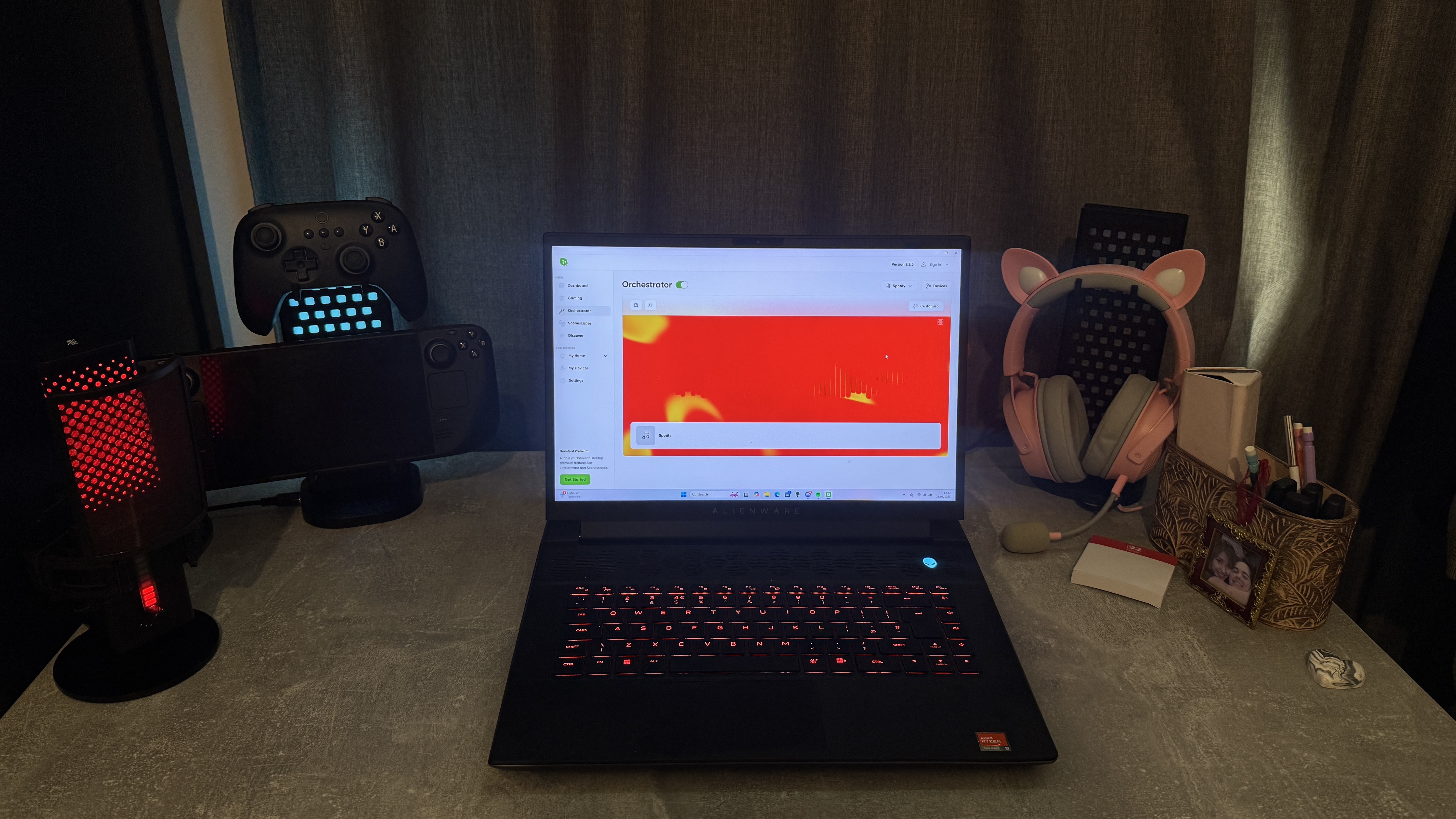
Until recently, my setup included my beloved Nanoleaf black hexagon wall panels, which served both as traditional and immersive smart lighting when hooked up to my PC via the Nanoleaf Desktop app, in addition to the remote controls afforded by the mobile app. Unfortunately, my new digs don't afford me the wallspace for these, so I was excited to see if Nanoleaf's latest gaming release, the Pegboard Desk Dock, would suitably fill the RGB-shaped void in my life.
Would that it were so simple.
I didn't peg you as a quitter
I'm in the throes of reviewing Nanoleaf's Pegboard Desk Dock, so this is far from a final verdict, but my early impressions tell a cautionary tale for all immersive lighting enthusiasts. This 3-in-1 smart light and desktop combo is an awesome concept; smartly designed, arriving with four hooks each, which can be arranged on the Pegboard to hold your gaming controllers, handheld PCs, and headsets. If you'd rather just have the Pegboard as a display piece, you can easily pull it out of the base and turn it around to show the rear light panel.
For me, this was a dream product. I'm always looking for ways to optimize my desk space, especially since I downsized when moving home, and I love Nanoleaf's wider range of smart lights.
So, after eagerly unboxing and setting up my new lights, I was eager to see my new setup in all its glory. Just watching the lights cycle through the colors of the rainbow before I'd even paired them with Nanoleaf's software was exciting enough.
Unlike many of Nanoleaf's other products, however, the Pegboard can't be added to the Nanoleaf mobile app; it works exclusively within the Nanoleaf Desktop app, and that's where my first problem came in.
While the lights' basic settings worked just fine when unpaired, as soon as I connected them to the app and tried to change their color output, they ceased to function, flashing on and off sporadically, rejecting any peripherals I plugged into the base and intermittently appearing as "Unreachable" within the Nanoleaf app.
I'd thought it was perhaps because they needed more power, so I plugged in my power supply; no joy. The software also offers little troubleshooting for the problem, and with everything running smoothly until the point I tried to pair them, I've come up short trying to fix them myself. I've yet to contact Nanoleaf about the issue, which I'll surely do before I give my final verdict, and I'm more than certain that a resolution exists; however, my experience paints a broader picture of immersive smart home lighting challenges.
(Image credit: Future)
Bigger fish to fry
I don't relish bemoaning the woeful state of smart home interoperability once again. The simple fact is, it's everyone's biggest problem, and that's not exclusive to smart lighting for the home; any smart home brand taking the walled garden approach, of which there are many, earns my ire in the age of Matter compatibility.
Gaming lights, in particular, suffer. On my gaming laptop, I've got a plethora of RGB and smart light controlling apps; Logitech G Hub, HyperX NGENUITY, Corsair iCUE, Razer Chroma, and Nanoleaf being the ones I used for this setup.
Now, some of these play nice with each other; namely, Nanoleaf links up to both Corsair iCUE and Razer Chroma, but that still leaves half of my peripherals setup disconnected. You're also at the mercy of software updates, which, especially if you use a hub app with multiple platforms connected to it, can make or break your setup.
There's also the non-small issue of the software itself. Running these background apps, especially if you aren't able to whittle them down by integrating different platforms, can use a fair bit of CPU and RAM. Especially if you're playing on a more lightweight machine, that can end up being pretty detrimental for high-stakes gaming.
Not all hope is lost when it comes to immersive smart lighting, though. Software like SignalRGB and OpenRGB goes a long way to mitigate compatibility problems, even if these are far from perfect. Still, things are heading in the right direction, just at a glacial pace – and if smart light makers want to light up the lives of gamers the world over, that will need to change to keep up with the sophisticated interfaces and experiences we're used to from our tech.
Even when it comes to immersive lighting for the TV, you can bet things are never simple. Screen extending lighting is increasingly popular, yet your options these days are limited; splurge on a pricey Philips Ambilight TV, opt for the still-pricey Hue light strip and sync box (which requires HDMI input and thus won't work with cable TV or built-in Smart TV software) or opt for a product like Nanoleaf 4D or Govee Ambient TV backlight, which points a camera at your screen to detect the action, will invariably have some small input lag.
My best advice? Stick with as many products from one light maker as possible, and for PC gaming, that will, in all likelihood, be a peripherals manufacturer with more focus on the RGB than the smart lighting of it all.
Want to start your own smart lighting setup? Shop my favorites below!
iPad getting true window management was a great addition, while the new design language across all platforms is sure to be a big focus come September. But relatively tucked away, almost as a footnote, was the promise of more features to come to Reminders - and seeing those features arrive might actually get me to move away from Things 3.
Let me explain.
Here’s the Thing
Cultured Code’s 'Things' app is, as anyone who uses it will tell you, the holy grail of UI design. It’s a task manager that looks so good, even Apple itself couldn’t have done a better job, and it’s been my go-to organizational tool for the best part of a decade. It's a powerful tool for anyone using one of the best MacBooks and Macs - or any Apple device, for that matter.
I use the app on my Mac, my iPad, my iPhone, and my Apple Watch, even jotting down tasks with an Action Button shortcut on my phone. And yet, I find myself straying from the path. It’s not that Things 3 is any less magical than it was when I started using it; it’s just that so many rivals have closed the gap.
Things 3 remains an easy place to dump tasks, file them away into sections, and enjoy that serotonin hit when you tick them off. There’s nothing wrong with that, but it’s missing some key features that its rivals now offer.
There’s no shared reminder list, so my wife can add things for me to do, and there’s no web version, either. It’s also lacking in ‘true’ Siri integration, meaning I essentially have to file my tasks in Reminders and have them sync across to Things 3 if I want them to be dictated.
So - what if I didn’t sync them across? What if I just, you know, used Apple Reminders to run my life?
Rejigging the system
I use Notion as a database to run my working life from, but Things is where my day-to-day stuff gets done. Every night, I load it up with tasks for the morning, and every morning, I start checking them off.
But what if my wife needs me to grab something from the shop? What if I want to ask Siri via CarPlay to add something to my daily list? These are the kinds of things where Reminders would work great, but that’s nothing new. In fact, Apple has been putting a ton of work into Reminders over the last few years, so what’s got me thinking of switching now?
As a writer, I’m wary of AI. Models trained on content I’ve worked hard for are always worth keeping a wary eye on, but I acknowledge that machine learning has plenty to offer (and no, I don’t mean those awful notification summaries).
This year, with iOS 26 and macOS Tahoe (and the assorted other Apple OS releases), Apple Intelligence will be integrated into Reminders, so that it can automatically assess what the next action item should be. Receive confirmation that one of my freelance articles has been published? It would be great to have a task pop up to invoice it. Make a note from a meeting? Having the place to send the details afterwards would be super helpful.
The app will even be able to intelligently work out which list your tasks should go into, meaning less time is spent funnelling them into the correct places.
I might be getting ahead of myself (and I’m not even sure if any AI functionality is in the current beta to test at present), but even if it’s not Reminders I move to (I still don’t love that UI), I feel like Things 3 (or surely a fourth version) could do with more forward thinking on the update front.
What could Things 4 add?
Okay then: Cultured Code, are you listening? There are a handful of things a longtime user like myself would love to see in a potential 'Things 4'.
For one, I’d love to have Morning/Afternoon/Evening as different timeslots (at present it’s just day and evening), which could then allow for more granularity with ordering tasks.
A web app is also a must (some of us use Windows, y’know?) while a collaborative list option could make Things 3 even better for small business owners like myself. And hey, a Kanban view would mean I don’t have to take tasks from Notion and throw them into Things, too.
Enterprise readiness for Windows 11 is improving but still uneven, says new report
Healthcare and finance sectors lag in upgrading outdated hardware
Migration is slowest in Americas despite most devices being upgrade-ready
Millions of enterprise devices are still running Windows 10, even as Microsoft’s deadline to end support for the OS approaches.
According to ControlUp’s latest Windows 11 Readiness report, half of all business-managed Windows devices have not yet made the switch.
That number reflects progress from last year, when over 80% of enterprise machines were still on Windows 10, but with support ending on October 14, 2025, time is running out for organizations still lagging behind.
Wide variation across industries
“While the 50% completion mark is a major milestone, it's not time to relax,” said Marcel Calef, Americas Field CTO at ControlUp. “Many enterprises still face hardware and planning challenges.”
The report analyzed over one million devices and found wide variation across industries.
Education and tech lead the way, with over 70% of systems upgraded. Healthcare and finance trail far behind, with fewer than half of their devices running Windows 11. Some healthcare devices are simply too old, with 19% needing replacement before an upgrade is possible.
Regional trends show the Americas are the slowest to move forward. Just 43% of enterprise devices there have upgraded, compared to 70% in Europe.
Notably, most of the un-upgraded machines in the Americas are technically capable of running Windows 11, but the switch hasn’t been made.
Larger organizations are also behind. Those managing more than 10,000 Windows devices have completed just 42% of migrations. Complex environments and aging infrastructure are slowing progress.
If your business still uses Windows 10, it’s time to take action. Start by checking which devices meet Windows 11’s requirements, like TPM 2.0 and Secure Boot. Replace what can’t be upgraded, and plan phased updates for the rest. Prioritize high-risk devices, back up data, and keep systems patched during the transition.
If upgrading isn’t possible, reduce risk by limiting access to sensitive systems, enabling built-in protections, and isolating outdated devices. Make sure all updates are current and that you're running the best antivirus software and best malware protection.
Microsoft is fully aware that the deadline is bad news for a lot of companies and is offering paid support through its Extended Security Updates (ESU) program, open to individuals and organizations. It isn't cheap of course.
Third-party provider 0patch also plans to deliver security fixes for at least five years after Microsoft ends support.
Mr. Hamza claimed over half the strikes in a coordinated wave of digital retaliation
Hacktivists redirected fury from Israel to America in a stunning 48-hour escalation
U.S. military-linked manufacturers became primary targets in a pointed cyber warning shot
An abrupt and massive rise in Distributed Denial of Service (DDoS) attacks against U.S. businesses has coincided with Washington’s involvement in the Israel-Iran conflict.
According to Radware’s Director of Threat Intelligence, Pascal Geenens, between June 21 and 22, 2025, hacktivist-led DDoS claims surged by 800%.
This dramatic increase was paralleled by a 900% drop in attacks against Israel, suggesting a deliberate redirection of focus away from Israel and toward its most prominent ally.
Key groups behind the DDoS escalation
The spike in cyber hostility has been attributed largely to the actions of a few specific threat groups.
Mr. Hamza, a hacktivist group known for its cyberattacks, was responsible for more than half of the claimed attacks in the U.S., while Mysterious Team Bangladesh and Keynous+ each claimed responsibility for over 17%.
The presence of other smaller groups, such as Team Fearless (PS), further indicates a broad, if loosely organized, coalition acting on a shared political motivation.
Radware’s data suggests this alignment stems more from anti-U.S. sentiment over its stance in the Middle Eastern conflict than from any centralized coordination.
Crucially, the sectors targeted during the June 22 escalation included manufacturing, finance, and government.
Manufacturing stood out not only in terms of volume but also in its specificity, with many of the victims tied to military and aerospace production.
This pattern points to more than random disruption, it reflects a calculated effort to destabilize core defense and economic infrastructures.
“Notably, many of the manufacturing-related targets were linked to military and defense production, particularly companies involved in air defense and aerospace systems,” Geenens emphasized.
The nature of DDoS attacks makes it difficult to determine long-term strategic intentions, but their use as a disruptive tool is clear.
Hacktivist-driven campaigns have historically served as early warnings of more sustained or damaging attacks.
These assaults are therefore more than digital noise, they may well foreshadow deeper incursions.
Companies that rely on online operations, from government contractors to sellers using ecommerce platforms, must strengthen their cyber resilience.
For those building new online storefronts using ecommerce website builders, security protocols now require as much attention as usability or design.
As a result, choosing providers that offer the best DDoS protection is no longer a matter of precaution but a necessity.
Some TV shows are like comfort food, and for me, there’s no show more comforting than Peep Show. The British sitcom from the early 2000s has been my go-to whenever I don’t know what to watch for quite some time now, and for good reasons.
For the uninitiated, Peep Show follows the miseries of self-doubting, uptight loan manager called Mark Corrigan (David Mitchell), who rents a room in his South London flat to Jeremy Usbourne (Robert Webb), aka Jez, an overconfident and impulsive musician.
Together, they stumble, blindly through day-to-day life, usually ending up in a desperate situation of their own making. There’s something weirdly cozy about watching two awkward flatmates spiral through life’s small humiliations, especially when their internal monologues are so brutally honest – and endlessly quotable.
I’m not ashamed to admit that I often find myself referencing memorable lines from the series. Don’t believe me? Given that I’m writing about a TV show, I can’t help but think about a fitting scene from one of my favorite episodes of the entire series, ‘Seasonal Beatings’ (episode 5 of season 7), where Mark is discussing what to watch next:
"We watched all the Losts and they were… somewhat okay, and Heroes had some interesting themes, but also quite a lot of… not so interesting themes. And Prison Break, by the end I very much wanted to break out of the prison that Prison Break had become for us."
Unlike many other shows, Peep Show isn’t just "somewhat okay". It does have interesting themes and I never want to break out of my habit of streaming it on repeat. Whether you’re discovering it for the first time on one of the best streaming services or rewatching it for the umpteenth time like me, Peep Show remains one of the most unique and rewarding comedies out there.
The series features some of the best side characters you'll ever meet. From Jez's ‘moreish’ bandmate Super Hans (Matt King) and Mark's ruthless boss Alan Johnson (Paterson Joseph) to Mark's love interests Sophie (Olivia Coleman) and Dobby (Isy Suttie), the supporting cast are every bit as quirky and engaging as the two leads.
Peep Show’s cringe humor often sees the show get compared to another well-loved sitcom you might have heard of: The Office. But while both shows are filled with awkward silences and cringe-inducing lead characters, Peep Show is in a class of its own.
Its humor is more polished (yes, there are moments of chaos but it doesn't turn slapstick), its underlining themes are much darker (in one episode it goes to the “heart of darkness”) and its characters are far more deluded (the show really doesn't hold back on just how much so at times). But at the same time, it’s not doing any of this in a pretentious way.
Indeed, there’s no gloss here. The flats are grim, the jobs are soul-crushing (although one character does get close to the ‘big three’: “museum, lunch and a snooze”), and the dreams are small. But that’s what makes the show so easy to watch, because it doesn’t pretend to be anything grand.
In the UK, Peep Show is one of the best Netflix shows you can stream.(Image credit: Channel 4)
The secondhand embarrassment you feel from the comedy is all amplified by the shaky point-of-view (POV) filming that the show is known for. There's nowhere for the viewer to hide. You see everything up close, making you feel like you're inside the lead characters' heads.
While the filming style is unique, it can also take some getting used to. The first season was very much still finding its (rainbow) rhythm with the POV camerawork, and mounted head cameras to the actors to produce the effect – the quality of the footage these cameras produced was quite low, which is why they're used less later in the series.
Basically, don't skip the first season because you're put off by the video quality; stick with it, because you'll be rewarded with some of the best gags in the series, including one that makes a reappearance in season 5, which you wouldn't otherwise get if you skipped it.
What also makes it such a comforting TV show to stream is that the episodes are short, usually just under 30 minutes, but a lot still happens throughout. Peep Show is the perfect series for short sittings when you need something light to watch because you can easily tune in and out of it.
So what are you waiting for? Pour yourself a massive drink. Turn on the TV and crack open this exceptionally funny show that deserves your attention immediately. Merry Peep Show watching everyone!
Peep Show is available to watch on Prime Video, Hulu and BritBox in the US, as well as some of the best free streaming services, including Pluto TV, Plex and The Roku Channel. Meanwhile, those in the UK can find it on Netflix, while Australians can stream it on Prime Video, BritBox and Stan.
It's never a bad time to barbecue, especially with one of these high-performance grills. CNET experts have chosen their top picks for 2025, each capable of keeping you and your crew well fed this summer.
They say fortune favors the bold, so why not rebel from cookie-cutter colorways and mix things up with some eye-catching tech instead? As a self-confessed color addict, I often find myself drawn to products rocking vibrant hues. But, experience has taught me that looks aren't everything, and no matter how pretty something may be, I'll soon tire of it if it proves inefficient.
To save others the trial and error, I've collated a list of six of our favorite products across a range of categories that not only performed well, but boast aesthetically pleasing colorways that'll satisfy those color cravings too.
Gamakay TK75 V2
(Image credit: Future)
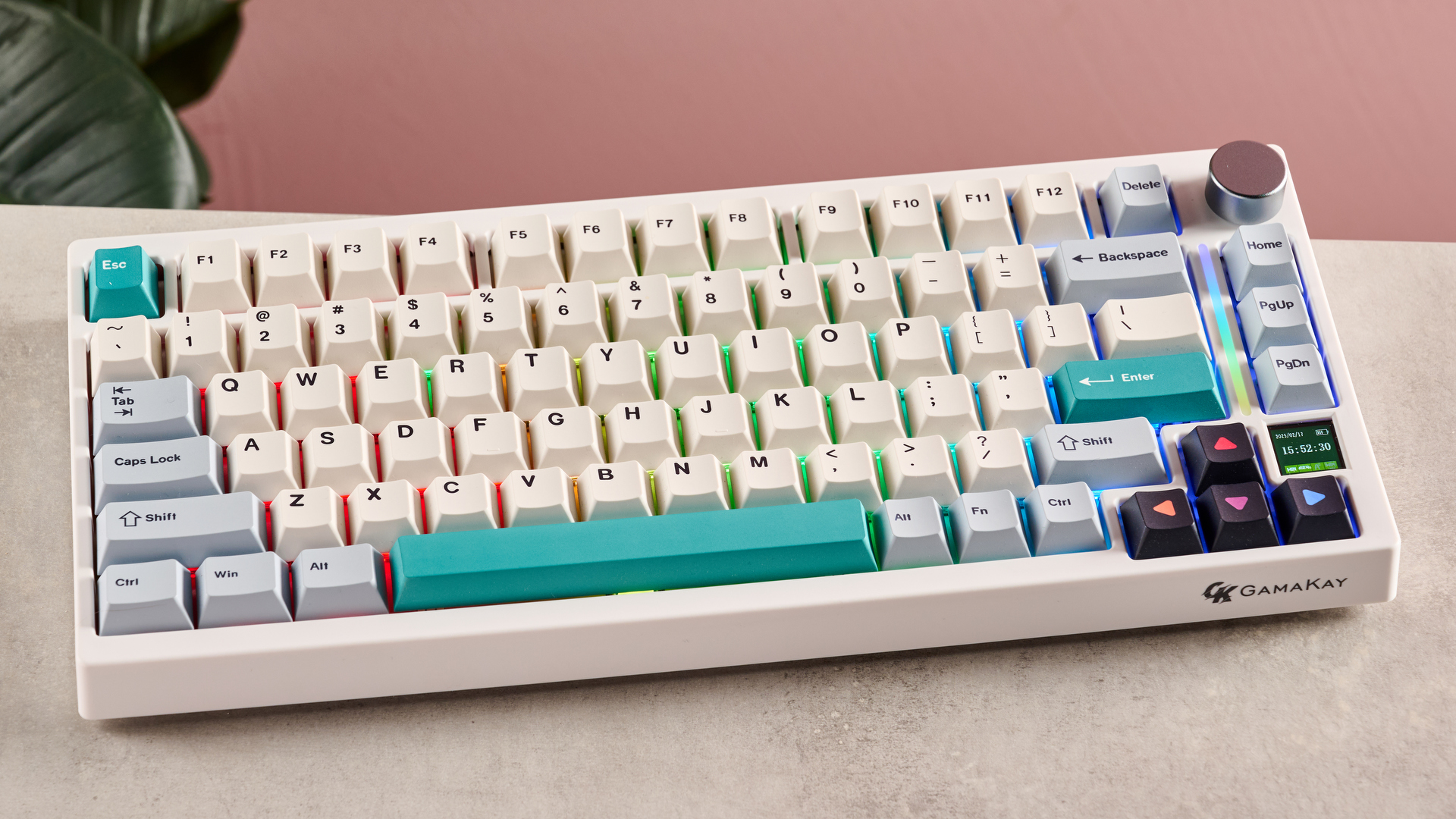
The Gamakay TK75 V2 keyboard is a well-built and well-performing mechanical keyboard that offers multiple wireless connectivity modes and a good level of customization for the $89.99 / £75 / $AU148 price tag.
Our reviewer was impressed by the performance of the Pegasus switches, describing them as ultra-quiet and smooth, while still providing a good level of feedback. He also appreciated the silky-smooth feel of the PBT keycaps, which range in color from white, like the rest of the body, to pale blue, teal, and black.
If I could have things my way, all of the best keyboards would have RGB lighting, so I appreciate the vivid RGB backlighting on the TK75 V2, and I’m loving that the extra vibrancy from the independently adjustable RGB light bar that lives toward the right-hand end of the keyboard.
The Gamakay TK75 V2 also has a novel little feature similar to others I’ve seen appearing on the market, namely a teeny little screen that’s nestled between the up and right arrow buttons, which is capable of showing colorful little images or GIFs.
For the down-low on this bright and beautiful keyboard, check out our Gamakay TK75 review.
Bose's QuietComfort Headphones have a list price of $349 / £349.95 / AU$549.95 and come in a wide range of colors, including black, white, sandstone, lilac, and three different blues, although the paler Moonstone Blue looks to only be available from Amazon US. There’s also a pretty Petal Pink model, but sadly for those of us in the UK, this color seems to only be available in the US and Australia.
The button controls on the QuietComforts are simple but satisfying, so I’ve not encountered any issues when skipping tracks or switching between noise-cancelling modes when on the move. Speaking of the ANC, it was rated excellent by our reviewer, and I agree completely, as it serves me well whenever I need to focus in a busy office, and it effectively filters out ambient sounds from noisy public transport.
Bose states that the QuietComforts have a battery life of 24 hours, though our reviewer managed to get closer to 26 hours during testing, and I’ve personally not needed to charge my pair up that often, considering the amount I use them.
If you’re looking for a pair of headphones that are as well-performing as they are pretty, I strongly suggest you give these a try. I recommend checking out our full Bose QuietComfort headphones review for a more in-depth analysis.
Govee Neon Rope Light 2
(Image credit: Future)
I review a lot of smart lights, and I have lots of them in my home. Some are set to white for practical use, but most are programmed to brighten my space as a colorful dopamine boost.
The Govee Neon Rope Light 2 brings something a little different to the table, however. It isn’t a smart light one would buy just to add a bit of ambient color; it’s designed to make a statement, and it succeeds. It comes in white or black, and has a list price of $69.99 / £79.99 for the 9.8ft / 3m model, and $99.99 /£99.99 for the 16.4ft / 5m model.
This isn’t the only smart light of this kind, but the incredible level of customization that’s on offer within the intuitive Govee Home app makes it a very good example. You can customize the Neon Rope Light 2 by picking your own color palette and applying it over the entire rope light or curating it in segments. Alternatively, you can make the most of the many pre-existing color palettes or explore the many colors and lighting effects on offer from the wide range of scenes.
Though it’s perfect for creating a vibrant and eye-catching neon sign, the variable temperature and brightness levels mean it can also be used more subtly to highlight a particular feature or artwork.
If you’d like to learn more about all the fun features on offer, why not have a read of my full Govee Neon Rope Light 2 review?
Dyson Supersonic Nural
(Image credit: Future)
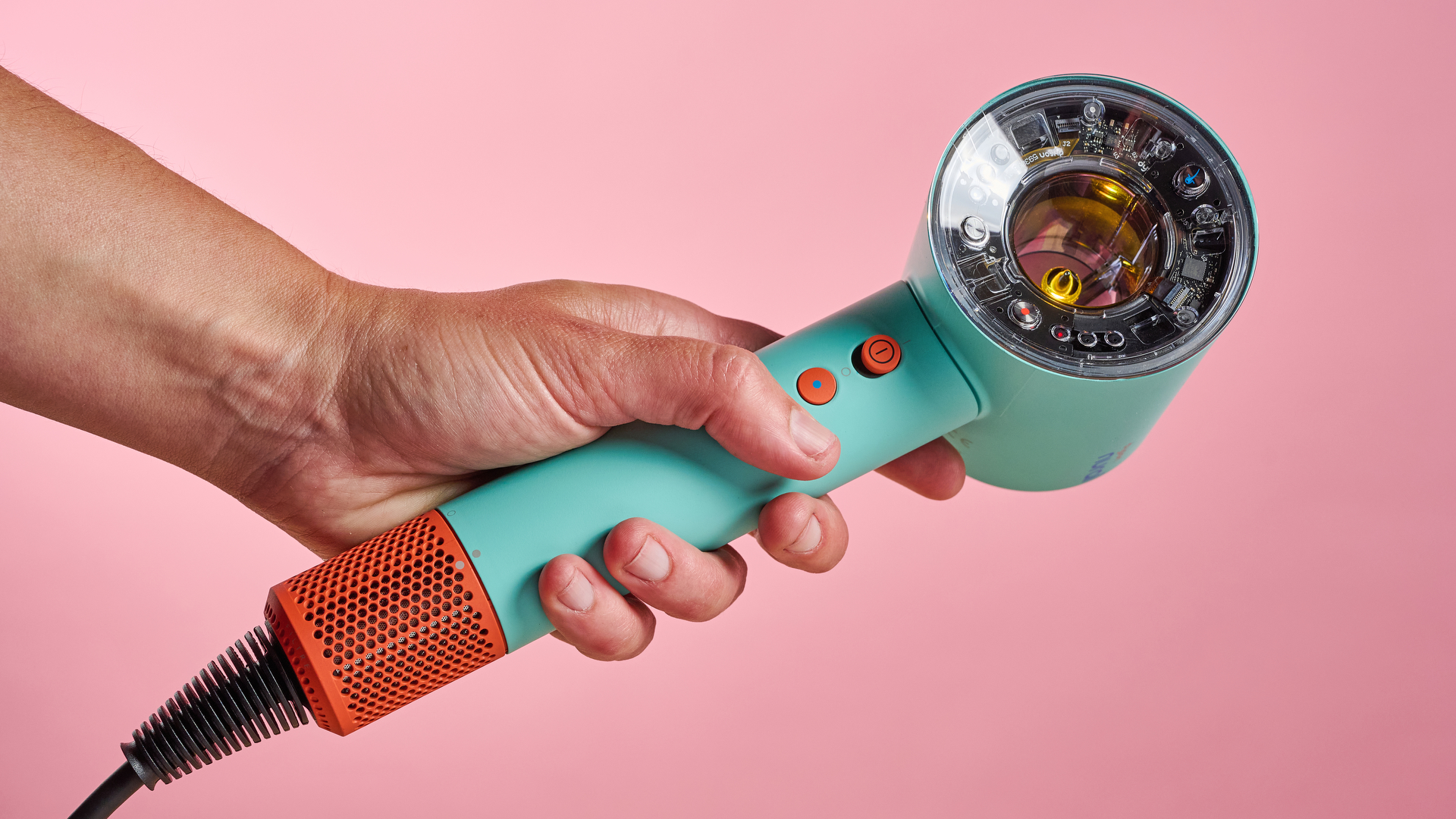
If someone had pitched the idea of a turquoise and orange hairdryer in the past, I’m fairly certain I would have raised an eyebrow, but I really can’t get enough of the Ceramic patina and topaz colorway, and the darker Vinca blue patina and topaz is pretty blimmin’ lovely too.
The price tag may be hefty at $499.99 / £399.99 / AU$750, but we were blown away by the performance of the Dyson Supersonic Nural.
It boasts several features, including an auto-pause mode, setting preference memory for each of its five attachments, and the innovative Scalp Protect mode. Our reviewer found this mode worked well, as it automatically adjusted the Dyson Supersonic Nural’s temperature based on how far it was away from her head, without noticeably lengthening the drying time compared to her usual just-blast-it-with-hot-air approach.
Obviously, this is a big investment to make just for a colorful hairdryer, but if you have the cash to spare, then you won’t be disappointed by the performance the Dyson Supersonic Nural delivers.
If you’d like to read more about how this eye-catching hairdryer performed, take a look at our full Dyson Supersonic Nural review.
SanDisk Creator Phone SSD
(Image credit: Alastair Jennings)
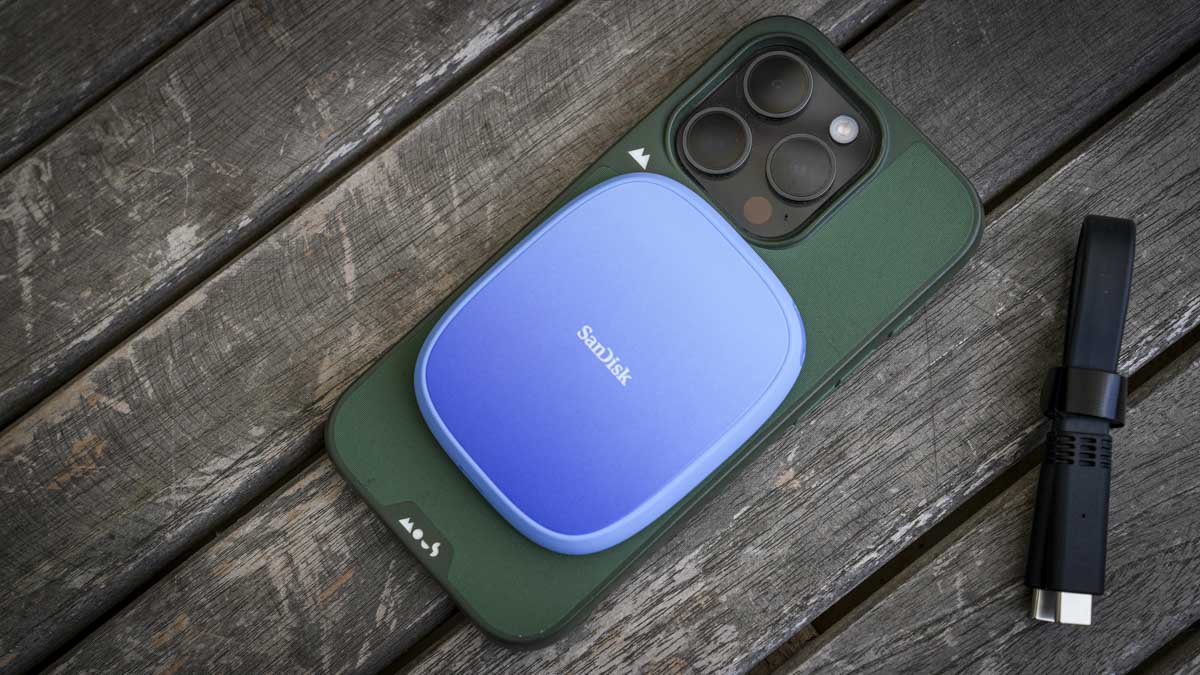
Most external hard drives are bland, black rectangles, but not this boisterously blue SanDisk Creator Phone SSD, which has a list price of $99 / £99 for 1TB of storage, or $156 / £156 for 2TB.
With USB-C connectivity and a handy lanyard loop, this MagSafe-compatible SSD makes a great portable hard drive for iPhone and Android users alike. Its slimline design makes it easy to pack away, and our reviewer found that this made it one of the few portable SSDs he’d tried that actually felt comfortable when on the back of his phone.
Despite weighing just 2oz / 54g, the build quality felt solid and robust. This, combined with the rubberized edges and IP65 dust and water-proof rating, provides some added reassurance when taking it out and about, though it’s important to remember that this rating means it doesn’t qualify as fully waterproof.
According to our reviewer, the performance of the USB 3.4 Gen 2 interface was spot-on, either exceeding or coming very close to the scores we wanted to see in the benchmarking tests. The Creator Phone SSD also had no problem keeping up with the demands of capturing over 12 minutes of ProRes video footage.
While the color wasn’t to his taste, our reviewer was a fan of the Creator Phone SSD overall, and considers it to be one of the best portable SSDs, whether you’re capturing ProRes video footage or simply using it for extended storage. If you’d like to learn about this portable SSD’s performance in more detail, I recommend checking out our full SanDisk Creator Phone SSD review.
Motorola Edge 50 Neo
(Image credit: Future)
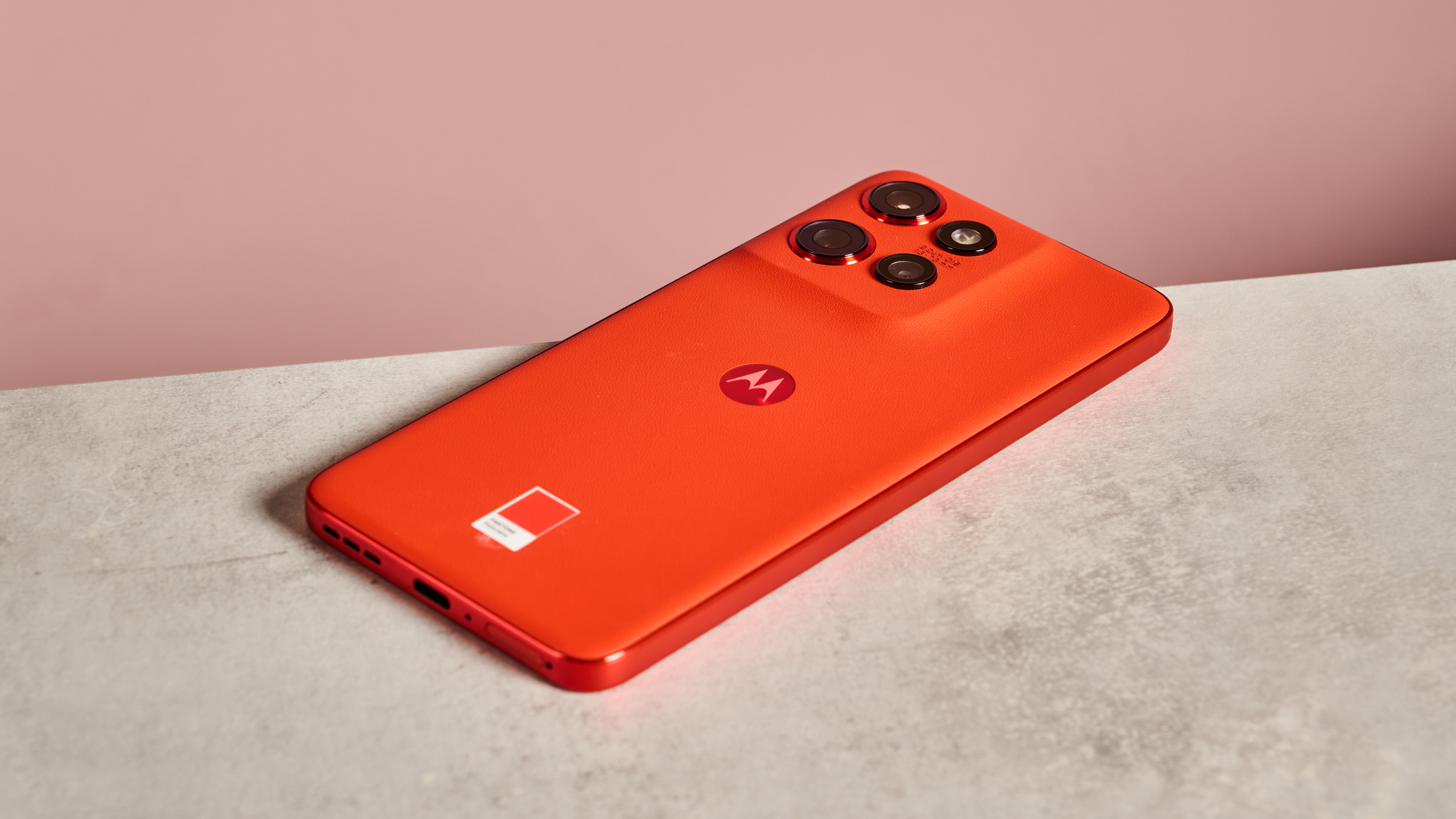
If you’re looking for a smartphone that makes a statement, then I think you’ll like the Motorola Edge 50 Neo. It has a list price of £399 / AU$699 (about $500), and is currently only available in the UK; however, Motorola has other colorful models in their Razr, Edge 60, and Moto G Stylus ranges.
All models of the Edge 50 feature a Pantone-curated colored case comprising pleasingly soft-to-the-touch vegan leather and a mixture of brushed and shiny-finished metallic edging. The model we reviewed was called Poinciana, which is a very eye-catching red-orange color.
When it was reviewed, the Motorola Edge 50 Neo came with the Android 14 OS installed, with the option to upgrade to Android 15. Motorola promised five Android OS upgrades and five years of security upgrades, which is good going for a phone of this price.
The 6.4-inch AMOLED display was satisfyingly bright for the price, and the colors on-screen were just as vibrant and eye-catching as its Pantone-colored casing. The Hello UI offered some useful security features and allowed for plenty of customization, too.
The cameras on offer include a 32MP front camera, a 50MP main and a 13MP ultra-wide camera, as well as a 10MP telephoto sensor, which delivered a solid performance for a mid-range phone.
If you’re looking for a lightweight mid-range phone with solid battery life that stands out from the crowd, I’d recommend taking a look at our full Motorola Edge 50 Neo review.