Friday, October 4, 2024

Latest Tech News

Sometimes I look at my robot vacuum and wonder if it knows how much I like it. I do not ponder if it's staring back at me, thinking...well...who know what? If I owned an Ecovac robot vacuum, though, that might be all I was thinking about and, soon, throwing a blanket over its potentially rapacious camera.

According to a new report and the work of long-time robot vacuum hackers, some Ecovac vacuums can, with some skill but no physical, access be hacked, giving would-be attackers access to all onboard systems and sensors, including the camera.

It's a simple and somewhat unnerving tale: An ABC Australia news reporter, Julian Fell, followed up on reports that some Ecovac vacuums could be hacked and was soon, with the permission of an Ecovac owner, hacking a robot vacuum in the safety of his news site's offices.

Not a hacker himself, Fell worked with Northeastern University Cybersecurity researcher Dennis Giese who (along with collaborators Braelynn Luedtke and Chris Anderson) discovered the hack and has spent years researching robot vacuum vulnerabilities. Via email, Giese told me he's researched most of the major robot vacuum manufacturers, including Neato and iRobot. "Ecovacs is a bit unlucky this year, as I usually swap the vendor every year. Next year, it might hit a different vendor."

Giese developed a payload and all Fell had to do was stand outside his offices, connect to the robot vacuum via Bluetooth, and download Giese's encrypted payload to it. That triggered a function in Ecovac's vacuum, which led to it downloading a script from Giese's server and then executing it. Within moments, both Fell and Giese had access to the robot vacuum's camera feed. They could see what it saw and, more chillingly, were able to, according to the report, use the speaker to send a message to the Ecovac's owner: "Hello Sean, I’m waaaatching you.”

At no point during this process did the robot vacuum indicate that it was under outside control.

Ecovac's POV

When contacted about the Hack story, Ecovacs sent me this response:

"ECOVACS places the highest priority on data security and customer privacy. To address some security issues raised over the last several months, the ECOVACS Security Committee initiated an internal review process of network connections and data storage. As a result, we have enhanced product security across multiple dimensions, and will continue to strengthen system security in upcoming updates.."

This differed slightly from what the company told TechCrunch in August. Back then, it mentioned the internal review process but also said consumers had little to worry about, claiming in the statement to TechCrunch, "Security issues pointed out by Giese and Braelynn are extremely rare in typical user environments and require specialized hacking tools and physical access to the device. Therefore, users can rest assured that they do not need to worry excessively about this."

While Ecovac was likely right about the programming tools, I asked Giese about the "physical access" claim since Fell's report detailed how he used only a Bluetooth connection from outside his office and the payload on his phone to hack the vacuum.

Giese told me that there are many different vulnerabilities, but for the one that Fell hacked, "You only need a phone and the magic payload. No physical access, you do not even need to know where the robot is, who it belongs to, or what kind of model it is. If you are in range, you can do it."

Giese first told Ecovacs about the vulnerability in December 2023 and told Fell that the company initially didn't even respond to the message. Giese, though, is not a Black Hat hacker and has no plans to release the details of the hack to the public. In fact, he has no particular beef with Ecovacs.

"Ecovacs was just unlucky this year...I am not super focused on Ecovacs and would have moved on by now if the problems were fixed."

"It appears that I 'bite' into that company and want to damage them, but that's not true. I am not super focused on Ecovacs and would have moved on by now if the problems were fixed," said Giese.

He added that he doesn't necessarily blame Ecovacs for these and other robot vacuum vulnerabilities. He claims that the company paid to get the proper certifications. " Ecovacs is also a victim here. They paid money to someone that was expected to certify them according to a standard (ETSI xxxx). There were a lot of things that should have been found (e.g. the SSL issues), but they were not."

As for what you should do if you own an Ecovacs robot vacuum: Start with making sure all your software is up-to-date. Ecovacs may not agree this is a dangerous vulnerability, but Ecovacs did tell us, "We have enhanced product security across multiple dimensions," which sounds like software updates to me.

In the meantime, you could do as the original Ecovacs consumer did and put a blanket over the robot vacuum camera when it's not in use.

You might also like


from TechRadar - All the latest technology news https://ift.tt/zihe1yE

Thursday, October 3, 2024

Best Vacuum Deals: Save Money and Time With Big Discounts on Top-Rated Vacuums

Snag one of these vacuum cleaner deals and you'll be saving time, effort and money.

from CNET https://ift.tt/BLfOUoR

Latest Tech News

The number of phishing emails that masquerade as notifications from Microsoft services is skyrocketing, a new report from Check Point has warned.

In the report, the researchers said that just in September, its service caught more than 5,000 such emails - and to make matters worse, the attackers have gotten extremely good at creating a legitimate-looking email.

The usual suspects - spelling and grammar, color scheme, the email’s outline - all of these things have been brought to perfection: “The language is perfect. The style is familiar. The graphics look impeccable,” the researchers said. “So, what should organizations do?” Furthermore, these emails now come with copy-pasted Microsoft privacy policy statements, or links to Microsoft and Bing, all of which makes spotting the ruse with the naked eye almost impossible.

Training and AI

Ultimately, even the ‘sender’ field in the email looks believable now. Instead of the usual private, or unknown domains, these emails appear to be coming from organizational domains impersonating legitimate administrators.

All of this means there is a higher chance of organizations losing sensitive information, or becoming infected with malware and even ransomware.

In response, organizations need to invest heavily into user awareness training, since employees will no longer be able to hunt for spelling and grammar mistakes in phishing emails, Check Point argues.

Also, they should deploy AI-powered email security, essentially fighting AI with AI, and finally, always keep their software and hardware updated.

We would add that deploying multi-factor authentication wherever possible, and even pivoting towards zero-trust network architecture, can only help in today’s diverse landscape.

More from TechRadar Pro


from TechRadar - All the latest technology news https://ift.tt/eWJPTxk

Wednesday, October 2, 2024

Best Laptop of 2024

Whether you're after a MacBook, Windows PC or Chromebook, these are the best laptops we've tested and reviewed, including the best laptop overall.

from CNET https://ift.tt/6kyIFXB

Latest Tech News

Microsoft has released a major announcement outlining all the new experiences coming to its new Copilot+ PCs and Windows 11, hoping to convince people to see the practical benefits of its AI-powered efforts. We’ll have to see how these developments play out when they’re more widespread and in the hands of everyday users, but Microsoft still seems to be going full steam ahead to make AI tools and features commonplace (and to be one of the first to do it).

Microsoft wants to use AI to assist you with everyday tasks like tracking down files and images, making them faster and easier. The idea is that you won’t even have to remember exact file and app names, but be able to describe the content in your own words and your device will be able to locate it.

Copilot+ PCs are designed to have AI integrated, and Microsoft claims that it’s seeing substantial customer demand and interest. You can get Copilot+ PCs running Windows 11 from manufacturers like Acer, Asus, Dell, HP, Lenovo, Samsung, and from Microsoft itsel;f through its Surface line, with processors from manufacturers including Qualcomm, Intel, and AMD.

Microsoft also that these new features will be made available to its Windows Insider community for user testing and feedback ahead of a general rollout in phases starting in October and November 2024.

Total Recall

Microsoft Corporate Vice President Pavan Davuluri speaks about Recall

(Image credit: Getty Images)

The first feature Microsoft will be previewing is Recall, which has so far seen a lot of criticism, specifically with respect to its possible security ramifications, ever since it was announced. Microsoft’s vision for Recall is to help you instantly find things you’ve already seen on your PC, like a website or file, by taking screenshots of your device activity, keeping a record, and making it searchable. It will be an opt-in feature and only accessible with Windows Hello, Microsoft’s alternative login feature that allows you to use sign in with facial recognition, your fingerprint, or a PIN.

Microsoft hopes that added security measures will make people feel confident enough to trust Recall, requiring login by Windows Hello and applying filter over sensitive information like payment details.

Other AI tools coming with the latest update

There are other shiny new feature like ‘Click to do,’ designed to suggest ways you can finish tasks using various features and apps. This feature will appear over images or text, suggesting possible actions for you to consider like erasing the background of a photo or finding out more information on the web. Another is super resolution in the Photos app, explained as being able to enhance lower-resolution and older photos to better quality, making them clearer and sharper.

One that’s not a new feature but instead enhancing an existing one is Windows Search, which will now use AI to fetch just the file you’re looking for after putting in a description of the file in your own words. Microsoft adds that you won’t need to be connected to the internet to use this capability, and it will become available in File Explorer first, followed by Windows Search itself and the Setting apps in the months following.

Joining an improved Windows Search, Microsoft is also giving the Paint app a boost, adding generative fill and generative erase capabilities. You’ll also be able to use the Cocreator image generation tool right in the app by describing your ideas in a prompt, maybe even adding some brush swipes, and having it create an image. Additionally, you can also remove parts or add elements to your existing images, and you’ll be able to use it without a subscription.

As Microsoft puts it, the number of these kinds apps and ‘emulated experiences’ will grow as more Copilot+ PCs hit the market this year and next.

Will Windows users embrace Microsoft’s vision?

Microsoft has released the main Windows 11 feature upgrade for this year, 24H2, and it brings AI capability to Copilot+ PCs to enable the features above when they arrive, as well as features and changes for all PCs running Windows 11. These include the new Energy Saver mode, improved Hearing Aid support, Wi-Fi 7 compatibility, HDR background support, and interface-related improvements.

Microsoft finishes off its announcement with its broader vision and what it wants you to see next. It appears to acknowledge that you might have feelings about Windows 11, but we’ll have to see what it ultimately delivers in the coming year.

Microsoft says it wants you to feel the difference as a positive new direction for Windows 11, which has definitely had its ups and downs since its release. Either way, this is a big next step, so we’ll have to see how these new features are received.


from TechRadar - All the latest technology news https://ift.tt/DXNwKdI

Latest Tech News

Hackers can now steal people’s cryptocurrency wallet seed phrases, even when they are stored as an image file, experts have warned

When a user sets up a new crypto wallet, they get a “seed phrase” - a set of 12 or 24 random words, which can later be used to restore the wallet in a new app or device (in case of loss or theft). Crooks that happen to steal a seed phrase can manage the money found in the wallet however they like.

But when a person saves the seed phrase in an image file (for example, with a screenshot), it makes the criminals’ job that much harder.

A highly potent threat

Enter Rhadamanthys version 0.7.0, recently introduced and carrying new, important bells and whistles. Recorded Future's Insikt Group recently analyzed this new version and released an in-depth report, which states that the infostealer now comes with Artificial Intelligence (AI) capabilities, and allows for optical character recognition (OCR).

Together, these two tools are called "Seed Phrase Image Recognition" which, in the above context, is pretty self explanatory.

"This allows Rhadamanthys to extract cryptocurrency wallet seed phrases from images, making it a highly potent threat for anyone dealing in cryptocurrencies," Recorded Future's Insikt Group said in its analysis. "The malware can recognize seed phrase images on the client side and send them back to the command-and-control (C2) server for further exploitation."

Even before the new features, Rhadamanthys was a potent, and popular infostealer. It was first discovered back in 2022, and has since grown into one of the most formidable pieces of malware. Hackers can subscribe to the service, paying $250 a month for the infostealer (or $550 for 90 days).

The latest version was released in June 2024, and comes as a "complete rewrite of both client-side and server-side frameworks, improving the program's execution stability." Recorded Future concluded.

Via The Hacker News

More from TechRadar Pro


from TechRadar - All the latest technology news https://ift.tt/ZDHL6Cx

Tuesday, October 1, 2024

Best Mattress Deals: Substantial Savings From Our Favorite Mattress Brands

Nothing helps you sleep better than knowing you got your new mattress for hundreds off.

from CNET https://ift.tt/jPTrZFq

Monday, September 30, 2024

Amazon's New Echo Spot Smart Alarm Clock Drops to Just $45 Ahead of October Prime Days

Amazon's second-gen Echo Spot is discounted by 44% in advance of Prime Day.

from CNET https://ift.tt/Ipn0MSV

Latest Tech News

When 2025 rolls around, I’ll have been a professional fitness writer for ten years, and a professional technology writer for five. In my long career writing about fitness and fitness tech, I’ve tried almost every category of workout equipment and health-based technology you can imagine.

I really mean it.

I’ve tried all manner of gadgets in the name of a review, from smart glucose monitors that require needles in your arms to smart sleep masks that play soothing sounds. I’ve tried intelligent insoles that slip into your shoes to tell you about your running gait, and AI-powered cameras that help you work out with dumbbells.

Smart workout mirrors? Smart rings? Peloton classes? Electro-stimulation to improve muscle tone? Bone-conduction headphone technology? All boxes checked.

It’s a far cry from reviewing the best fitness trackers and best running shoes on the market. In that time, amongst all the gadgets I’ve tested, there’s only a handful of pieces of hardware that I really use in my personal life on a regular basis.

It almost says a lot about the state of the industry that each piece of wellness tech is marketed as a game-changer, a problem-solver, yet I keep coming back to the same old bits of kit. As someone with unfettered access to all the gear in TechRadar towers, that says a lot. So, without further ado, below I’ve listed the only pieces of tech I go back to time and time again.

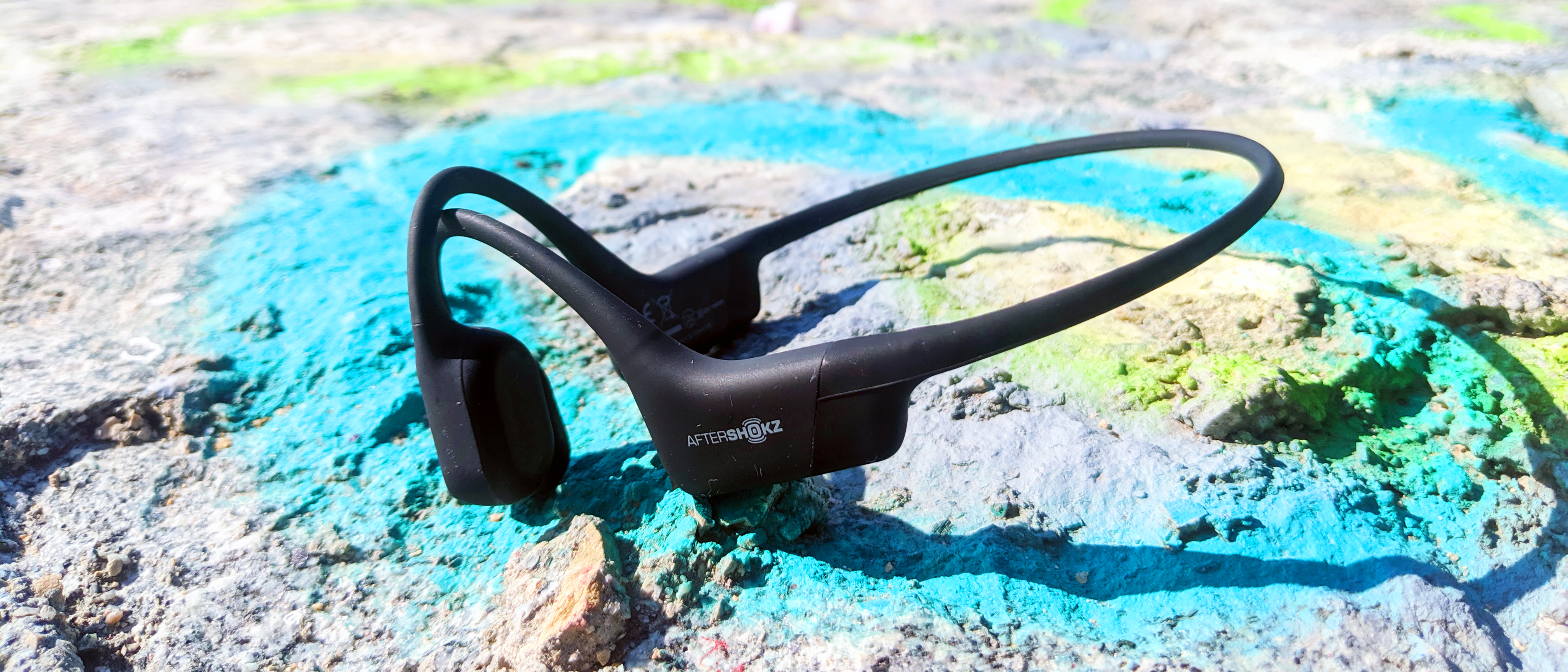
Bone conduction headphones: Shokz OpenRun

aftershokz aeropex

(Image credit: TechRadar)

Whether you’re running, cycling or doing any form of exercise outdoors, it pays to be aware of your surroundings.

I’ve used Shokz OpenRun for years as a way to listen to music or podcasts broadcasting from my phone during runs without sacrificing situational awareness. You could technically do the same thing with AirPods or other workout headphones using their HearThrough or Conversation modes, but the best bone conduction headphones are built to leave your ears free.

While the OpenRun Pro are more expensive, offering faster charging and longer life, I still use the original OpenRun and have experienced no problems with the battery even after all this time.

They’re comfortable to wear for long periods and during very long runs, I also call my wife or family to break up the monotony and they can hear me just fine.

This is the set of headphones that got me through two marathons over two consecutive years.

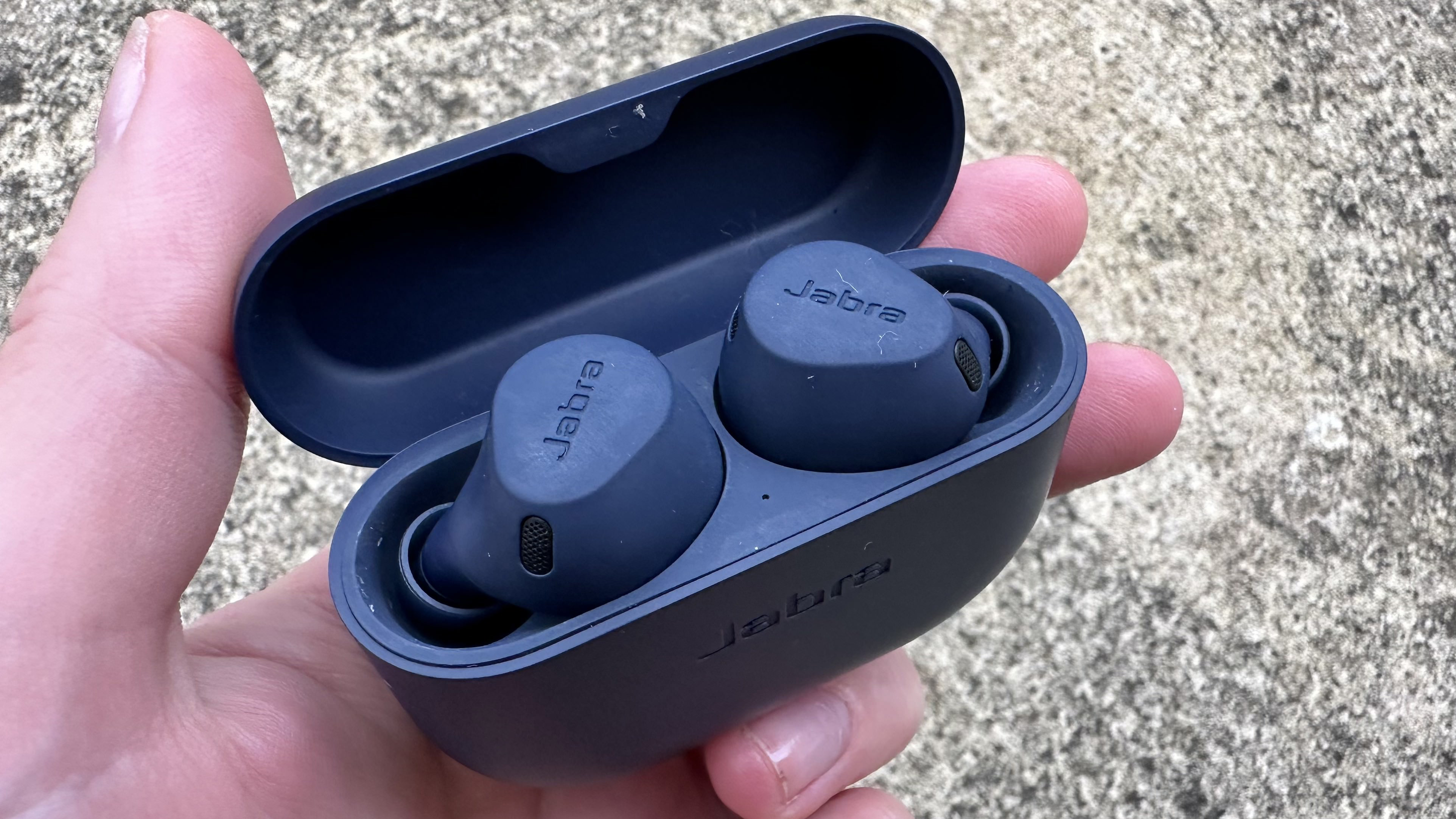
In-ear headphones: Jabra Elite 8 Active

Jabra Elite 8 Active

(Image credit: Becca Caddy)

In my marathon off-seasons, I like to hit the gym in order to regain the muscle mass I lose when running takes over my life.

This is where a lot of gear falls down for me to use: even the best smart rings, for example, are at risk of scratching and being damaged when I’m lifting weights, so I use a watch instead.

Likewise with bone conduction headphones: while outside I like to be able to hear my surroundings, in a commercial gym you need headphones to kill the gym’s music and the noise of other gym-goers to focus on your own workouts.

I used to use a cheap pair of Anker Soundcare P20s for this, but when those finally died, I switched to a pair of Jabra Elite 8 Active, the best workout headphones on the market right now, and haven’t looked back.

They’re comfortable, tough, completely waterproof (they survived a glass of water, at any rate), and have Active Noise Canceling I can switch on and off if I need to ask a staff member a question, or another lifter if I can work in. Easy to set up, simple to use, tough as nails, and long-lasting.

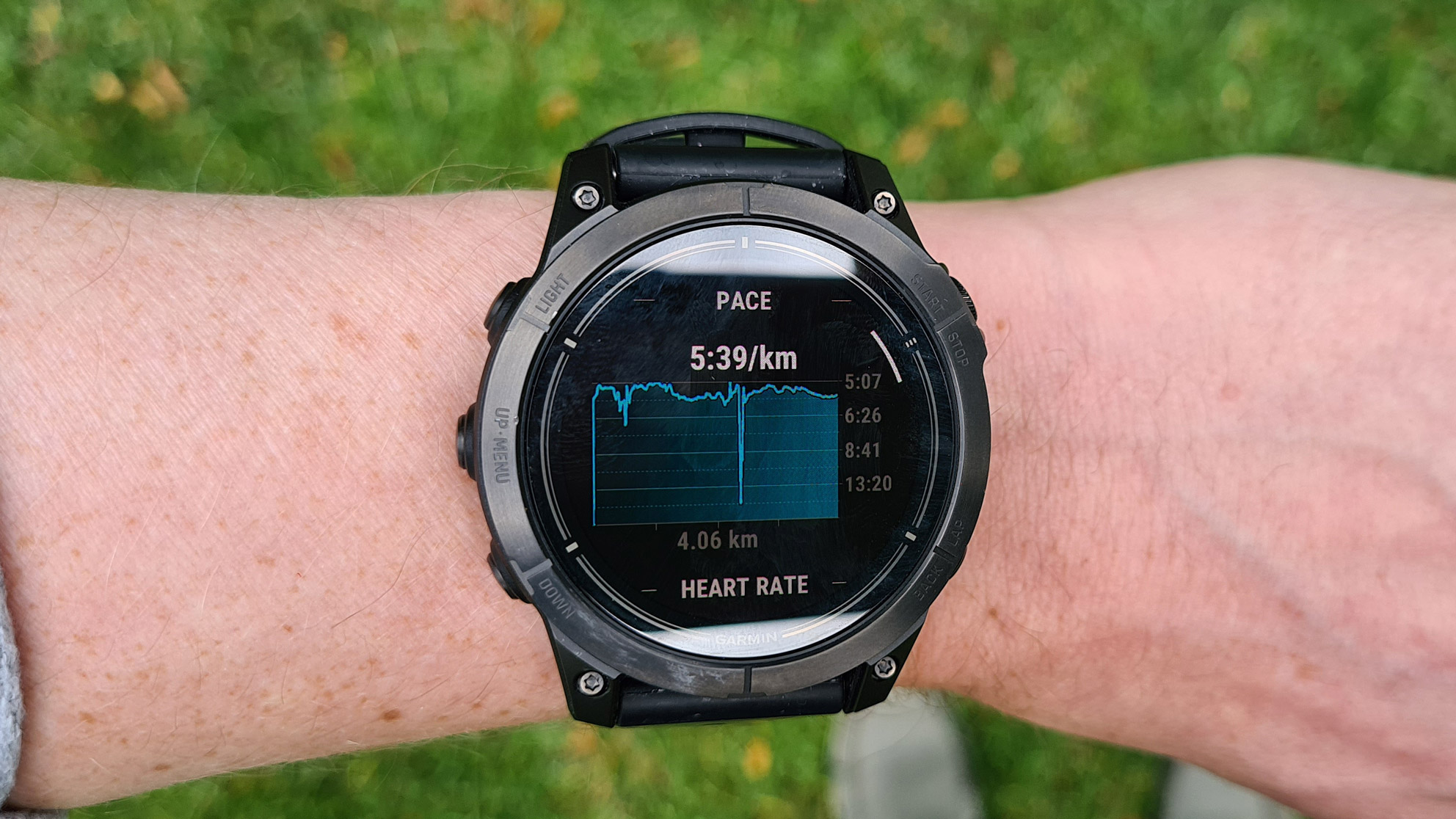
Smartwatch: Garmin Epix Pro

Garmin Epix Pro

(Image credit: Future / Matt Evans)

I really want to recommend the Apple Watch Ultra 2 here as it’s functionally fab, but short battery lives on smartwatches continue to be a frustration for me.

The Garmin Epix Pro lasts for ages, and it has the running tool I use most: route creation. For hikers, runners, and cyclists yet to plan routes using Garmin Connect and follow the directions on your watch, it’s a game changer. It’s the single smartwatch feature that’s made the most difference in my training.

I also like big, chunky watches and dislike charging watches often, so the Fenix range (including the Epix Pro) fits the bill nicely. Although I know some people find smartwatches uncomfortable to wear in bed, I don’t mind at all.

Plus, even though I don’t tend to use my smartwatch to formally track sets and reps in the gym, it doesn’t get in the way of my weight-based workouts in the same way that a smart ring does, so it’s passively tracking activity and calorie burn in the background and factoring it into my recovery metrics.

You might also like...


from TechRadar - All the latest technology news https://ift.tt/lTzKWn0

Sunday, September 29, 2024

Best Sleep Headphones of 2024

If you’re having a hard time falling asleep at night, sleep headphones can help. Here are some of the best Bluetooth headbands and noise-canceling earbuds on the market.

from CNET https://ift.tt/D2Objxf

Latest Tech News

US trade restrictions have created significant obstacles for Chinese companies, limiting their access to advanced AI hardware needed to remain competitive globally.

Nvidia’s H20 GPUs, scaled-down versions of the powerful H100, were developed to meet export control requirements but still come with a hefty price tag of around $10,000 per unit.

Even at that price, the availability of these GPUs is limited, compounding the difficulties Chinese companies face. This shortage has fueled a thriving black market for Nvidia’s high-end chips, such as the H100 and A100, where prices continue to rise due to overwhelming demand. However, global companies, particularly ByteDance - the parent company of TikTok, already under intense scrutiny in the US - cannot afford the legal and reputational risks associated with engaging in such illicit markets.

Two AI chips

ByteDance has made significant investments in AI, reportedly spending over $2 billion on Nvidia's H20 GPUs in 2024, and now according to The Information, the company is looking to develop its own AI GPUs to reduce dependency on Nvidia.

The report adds these chips will include one designed for AI training and another for AI inference, and both will be produced using TSMC’s advanced N4/N5 process, the same technology used for Nvidia’s Blackwell GPUs.

Broadcom, recognized for its AI chip designs for Google, will reportedly lead the development of these GPUs, which are expected to enter mass production by 2026. While several Chinese companies have developed their own AI GPUs to reduce reliance on Nvidia, most still depend on Nvidia’s hardware for more demanding tasks. Whether ByteDance can fully transition to its own hardware - and whether it would want to - remains to be seen.

The move will certainly not be without challenges. As Tom's Hardware notes, “The company now relies on Nvidia's CUDA and supporting software stack for AI training and inference. Once it goes with its AI GPUs, it must develop its software platform and ensure its software stack is fully compatible with its hardware."

More from TechRadar Pro


from TechRadar - All the latest technology news https://ift.tt/BPJGFf3

Saturday, September 28, 2024

Sonic Characters Will Become DC Superheroes in New Sega Partnership

Sonic as the Flash, and Shadow as Batman?

from CNET https://ift.tt/iHOKdVJ

Latest Tech News

Popular gaming hardware manufacturer Razer has announced a batch of new products at its annual RazerCon event.

The headlining products are the Razer Kraken V4 Pro and the Razer Freyja. The former is a seriously premium addition to the brand's gaming headset lineup, while the latter is described as "the world's first HD haptic gaming cushion." 

That right, it's a vibrating seat cushion for your gaming chair.

The Kraken V4 Pro joins the headset's fourth-generation lineup alongside the standard Kraken V4 and the wired Kraken V4 X which Razer revealed last month. The Pro model looks like quite the step up in terms of features (and price, but we'll get to that). Razer's bespoke Sensa HD haptics are included here, causing the headset to react to in-game activities with directional haptic feedback.

A handful of games will directly support the technology, including Final Fantasy 16, Stalker 2: Heart of Chornobyl, and Silent Hill 2. I got to test the haptics for myself at a Razer briefing last week and they definitely felt like an improvement over the Razer Kaira Pro's HyperSense feedback, feeling much more nuanced and, well, less like you had a bee in your headset.

The Kraken V4 Pro also includes a PC-compatible OLED Control Hub that allows for on-the-fly tweaks to your settings as well as the monitoring of volume, battery life and other metrics. You're getting customizable Chroma RGB on the ear cups, dual audio support and instant switching between 2.4GHz and Bluetooth (handy if you need to take a quick call while gaming), 40mm drivers supported by THX spatial audio and a retractable mic. 

The Razer Kraken V4 Pro is available to buy now from Razer's website and other retailers, but it doesn't come cheap. Expect to pay $399.99 / £399.99 which is a pretty giant step up from other models in the Kraken V4 lineup. Still, it's in with a chance of landing in our list of the best PC gaming headsets with its stacked feature set and intelligent Sensa HD haptics.

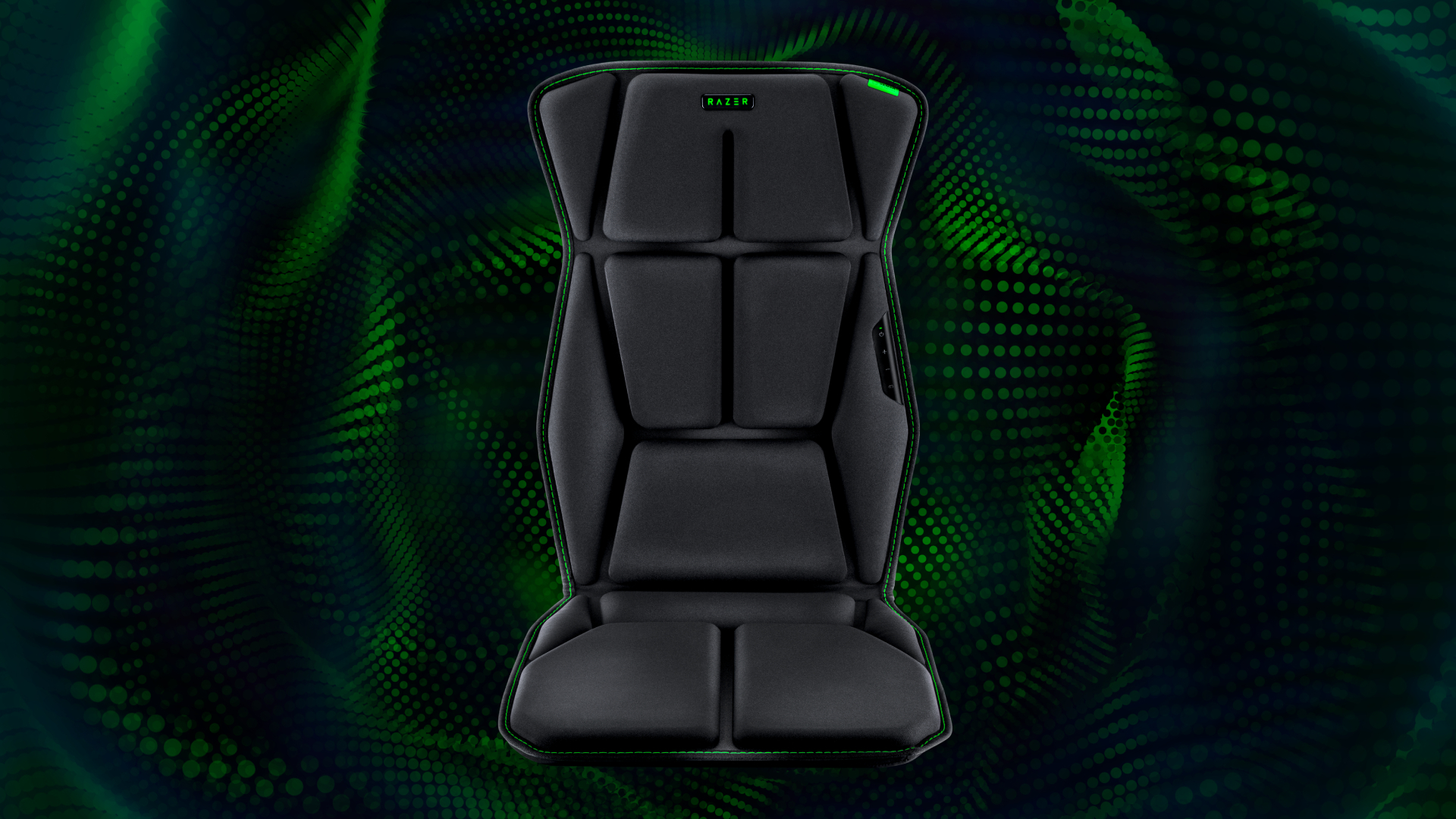
Razer Freyja

(Image credit: Razer)

The other major reveal from this year's RazerCon is the all-new Razer Freyja. This is a seat cushion that'll fit any of the best gaming chairs that, much like the Kraken V4 Pro, is powered by Sensa HD haptic feedback. That means the chair's multi-directional haptics (with six motors: four behind you, and two where you sit) react to everything from light drizzles to sword slashes and chunky explosions.

Testing this at the Razer briefing last week, I found the default settings to be a little intense. Thankfully, you are able to adjust the haptics' strength on the fly, which made the experience much more tolerable. That said, the Freyja is certainly going to have niche appeal. It doesn't really offer anything to your play session aside from some neat haptics. It is at least very comfy, but I did notice the haptics here were incredibly loud. 

If you live with family or housemates, you might want to consider investing in some soundproofing for your room if you're buying the Freyja. It's also available now from Razer's website for $299.99. The product is unfortunately not available for purchase in the UK at this time.

You might also like...


from TechRadar - All the latest technology news https://ift.tt/dGe1Rnh

Friday, September 27, 2024

5 Ways a Portable Power Station Can Help You Through a Power Outage

Whether you're caught in a hurricane or other bad weather, a big battery can keep your gadgets and your refrigerator alive.

from CNET https://ift.tt/dUaw5iF

Latest Tech News

With macOS Sequoia, Apple introduced a feature whereby users are asked to regularly approve access for apps to be allowed to record their screen - which has not gone down too well with some folks, although there’s now a solution (albeit a third-party one).

From Apple’s perspective, this move was made to improve security in apps like Zoom where you might share your screen (or indeed screenshot utilities). The recurring permission requests for such apps first started appearing early in beta testing macOS 15, and they were introduced on a weekly basis initially, but later (following many complaints) Apple revised that to monthly prompts

And to be fair, I could still see these pop-ups being bothersome, even on a monthly basis, and you might prefer not to see them at all (or just the once, rather, when you first use the app). Luckily, there’s now a workaround that MacRumors spotted in the form of an app called Amnesia.

Once installed, Amnesia can be used to stop the monthly screen recording permission requests on an app-by-app basis. The software is pay-what-you-want, so you can give the developer whatever you feel is an appropriate payment for the convenience of the app.

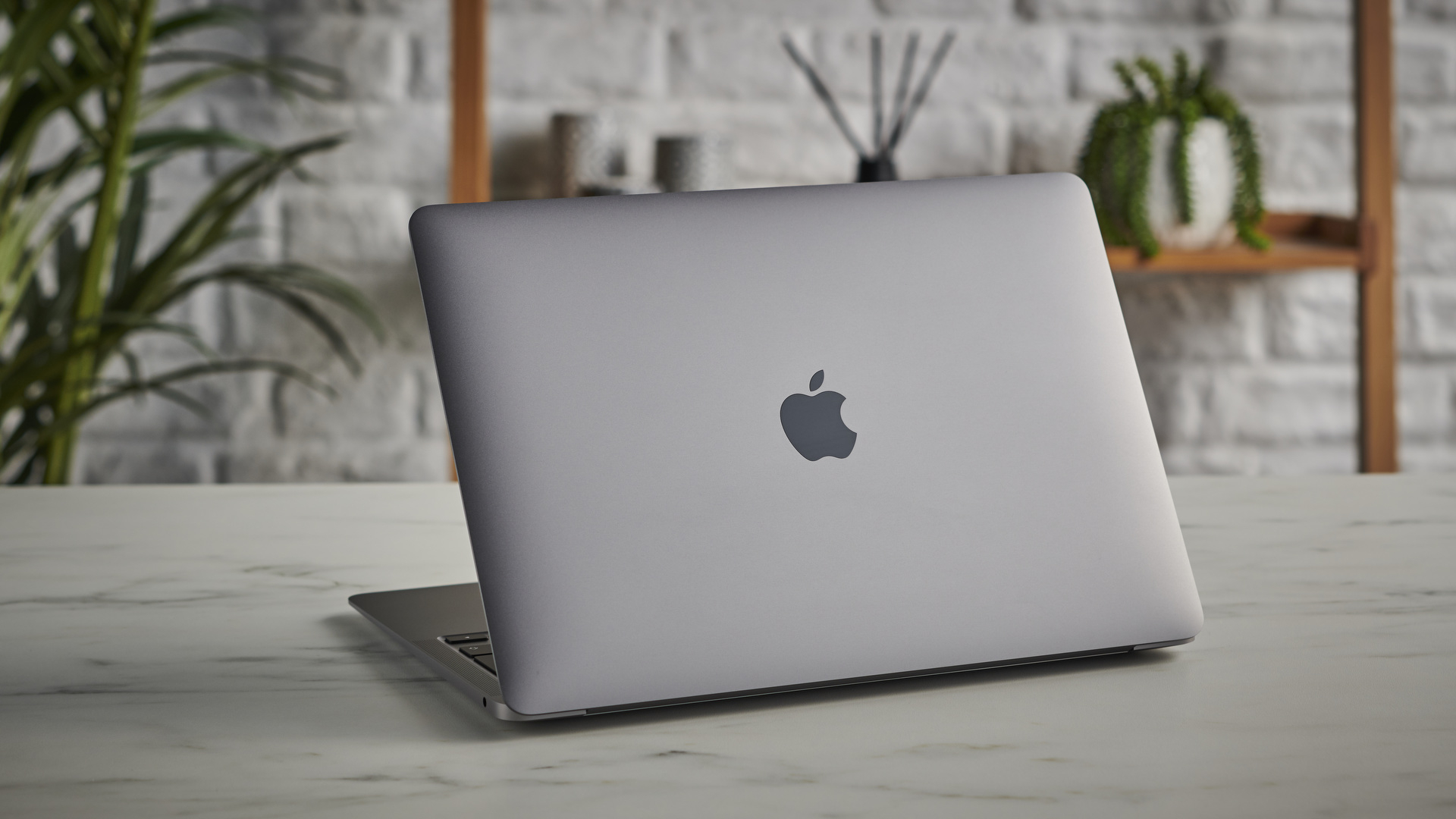
MacBook Air M1 on a table showing the lid and Apple logo

(Image credit: Future)

There's another potential workaround - but will Apple do something itself?

The original version of Amnesia was for macOS 15 only, but since that release, support for macOS 15.1 (beta) has been introduced. You can check out Amnesia’s changelog (a record of updates made to the app) to see all the recent additions and adjustments for the software.

Alternatively, if you’re a little more of a techie, as MacRumors points out, you can also achieve the same result as Amnesia via the Terminal app by following instructions provided by tech blogger Jeff Johnson. Just as with Amnesia, this workaround makes it so that the screen recording reminders are turned off on an app-by-app basis.

I hope Apple considers revising this repetitive request for permissions. I’m not saying that the company has to get rid of it entirely, but maybe give macOS 15 users the option to switch to quarterly or biannual requests instead. I understand that Apple is trying to cover itself and its customers from a security perspective, but I think there’s more give here in terms of striking a balance that satisfies keeping macOS a safe environment, while annoying users less.

YOU MIGHT ALSO LIKE...


from TechRadar - All the latest technology news https://ift.tt/Aw5SJeV

Latest Tech News

The all-new Google Fitbit Air is now available to preorder, so you can find incredible deals on top-rated Fitb...