Twitter has revealed it currently removes one million bots every day in order to keep its platform safe..
Bots, in this context, are malicious, or spam accounts, fake identities that leave meaningless comments on people’s tweets, or are used to promote an account, or a website.
In some cases, bots are used to distribute ransomware, or other forms of malware, as well.
Eliminate bots, or die trying
The news was confirmed by Twitter executives reported by Reuters, and comes as Elon Musk, the eccentric billionaire and Tesla/SpaceX/StarLink/Boring Company CEO demands more transparency as he looks to complete a potential takeover.
Musk has asked Twitter’s executives to share more details on the company’s claim that it keeps the number of automated bots under 5%. Unless it can prove that bots represent less than 5% of the accounts being served ads on the platform, the $44 billion deal might break down, Reuters reminds.
Still, during the conference call with the press, Twitter’s executives said spam accounts represent less than 5% of the company’s user count, a figure that stood more or less the same since 2013.
Twitter analyzes accounts manually, to determine whether or not they have genuine human users, or are run by programs. Then, it uses a combination of public and private data to generate reports for its shareholders and notify them of the number of spam bots on the platform, Twitter explained.
The company also said that due to the nature of data needed in order to perform such analysis, there is no way for an external auditor to analyze the platform. It did not want to say what kind of data it will provide to the potential buyer.
At the same time, Musk said that once he acquires the platform, he will work on defeating the spam bots, “or die trying.”
Verizon's 3G CDMA network will shut down on December 31, 2022, but the carrier revealed it's handing out free phones to the users who stayed on the old connection standard.
These new phones work on the current 4G LTE network and aren't anything fancy, just basic flip phones. There are three phones available: the Orbic Journey V (retail value $99.99), the TCL FLIP Pro (retail value $79.99), and the Nokia 2720 V Flip (retail value $79.99). With phones this basic, don’t expect a whole lot out of them. Although the Nokia phone does have Google Assistant and YouTube apps, so that’s at least something.
Unfortunately, 3G holdouts don't get to choose their giveaway phones. A Verizon representative confirmed that the device they'll receive will be chosen by the company. It also said to keep an eye out for any notifications from Verizon about the 4G phones. No word on how long it'll take for the new devices to ship.
Verizon noted that the old 3G cell-service contract will carry over to the new phone at no extra cost. There’s also the option of declining the phone. All you have to do is call customer service and tell them that you don’t want it.
Once people get their new 4G phone, there’s a little bit of setup that they’ll have to perform to get it going. The old 3G phone must be turned off first before activating the new phone. If the 4G device isn't activated within 30 days, Verizon will do it for you automatically. The company recommends people backup their contacts to Verizon Cloud so they can download them to their new phone. You can find a set of instructions on their website on how to do this. Verizon also recommends taking the old phone to a Verizon store so it can be recycled.
Some people may be hesitant to make the jump because they have accessibility features enabled on their old phones. If that’s the case, Verizon recommends contacting the carrier to find a better solution for their needs.
Out with the old
Verizon was originally going to pull the plug on their 3G network back in 2019 but kept delaying it. According to company Vice President Mike Haberman, the company wanted to give people ample time to switch and to “minimize disruptions.”
As to why they’re shutting down their network, it’s to better support the faster connections and develop new ones. The way it works is that a cellular connection has to share space with other connections on the network. But in turn, that holds back the potential of 4G and 5G speeds. With 3G shutting down, they can put more resources into improving the other standards. Plus Verizon can repurpose the tech and put them toward developing a 6G network.
It’s entirely possible that one day we’ll see the same thing happen to the 4G network, but that probably won’t be any time soon. For those shopping for a new phone, TechRadar recently published a list of the best deals for July 2022.
from TechRadar - All the latest technology news https://ift.tt/iDtxqov
A new Linux malware has been discovered that is capable of avoiding detection by antivirus programs, steals sensitive data from compromised endpoints and infects all processes running on a device.
Cybersecurity researchers from Intezer Labs say the malware, dubbed OrBit, modifies the LD_PRELOAD environment variable, allowing it to hijack shared libraries and, consequently, intercept function calls.
"The malware implements advanced evasion techniques and gains persistence on the machine by hooking key functions, provides the threat actors with remote access capabilities over SSH, harvests credentials, and logs TTY commands," Intezer Labs researcher Nicole Fishbein explained.
Hiding in plain sight
"Once the malware is installed it will infect all of the running processes, including new processes, that are running on the machine."
Up until only recently, most antivirus solutions did not treat OrBit dropper, or payload, as malicious, the researchers said but added that now, some anti-malware service providers do identify OrBit as malicious.
"This malware steals information from different commands and utilities and stores them in specific files on the machine. Besides, there is an extensive usage of files for storing data, something that was not seen before," Fishbein concluded.
"What makes this malware especially interesting is the almost hermetic hooking of libraries on the victim machine, that allows the malware to gain persistence and evade detection while stealing information and setting SSH backdoor."
Threat actors have been quite active on the Linux platform lately, BleepingComputer has found. Besides OrBit, the recently discovered Symbiote malware also uses the LD_PRELOAD directive to load itself into running processes. It acts as a system-wide parasite, the publication claims, adding that it leaves no sign of infection.
BPFDoor is a similar malware strain, as well. It targets Linux systems and hides by using the names of common Linux daemons. This helped it stay under antivirus radars for five years.
Besides these two, there is also Syslogk, capable of both loading, and hiding, malicious programs. As revealed by cybersecurity researchers from Avast, the rootkit malware is based on an old, open-sourced rootkit called Adore-Ng. It’s also in a relatively early stage of (active) development, so whether or not it evolves into a full-blown threat, remains to be seen.
Microsoft has made a significant change to its Insider program by splitting its group of volunteer software testers into two teams.
In an update to its Beta Channel, both groups will continue to be able to test the upcoming 22H2 build of Windows 11, but the features each group will get access to will differ.
For some testers - known as Windows Insiders - the build number will be artificially incremented. Those fortunate enough to get version 22622.xxx will get to experience some new features, while those stuck to 22621.xxx will have these turned off in the code by default.
That said, the majority of Windows Insiders will get the 22622.xxx upgrade, and those who are lumped with 22621.xxx will be able to check for updates, and subsequently upgrade to 22622.xxx.
New features and fixes in Windows 11
This will allow Microsoft to test releasing updates that have certain features disabled, helping it to understand how it can proceed in the future with incremental updates, and tinkering with the code to enable new features.
“By comparing feedback and usage data between [Windows] Insiders in these two groups, we will get to see if a feature is causing issues with reliability,” the company said.
In the process of dividing its helpers into two groups, “some [Windows] Insiders who had previous features rolled out to them may see them disappear.” These can be brought back by installing an enablement package, which the company recognizes “isn’t ideal.”
In its latest build - 22622.290 - Windows 11 will suggest that users who copy a phone number make a phone call. Copied dates will also result in the OS recommending that users add this to their calendars.
Furthermore, 22622.290 also allows OneDrive subscribers to manage their accounts and billing from within the native Settings menu instead of navigating to the page online. Additional updates include various fixes and tweaks to File Explorer.
Starting in August, you won’t have to connect a Facebook account to use Meta’s virtual reality (VR) headsets as the company is rolling out a new account system.
People using a Facebook account will be forced to make the switch. Meta’s original plan of ditching support for Oculus accounts is still slated for January 1, 2023. After that date, you’ll have to create a new Meta account in order to continue playing.
The company clarifies its account system is not directly tied to social media platforms. No one will know what you’re playing unless you share the information. But people do have the option to connect their Meta account to either Facebook or Instagram via the Accounts Center and unlock new features. These include finding Facebook friends to play VR games with and talking to people on the Messenger app.
The company is also working on a feature that’ll allow you to use your Meta account on other Meta devices. We contacted Meta to find out when the extended functionality will launch and what else Meta is working on. We’ll update this story if we hear back.
New profiles and security
In addition to the Meta accounts, the company is implementing Horizon Profiles with new privacy controls.
Horizon Profiles are in-game accounts that will house a player’s avatar, profile picture, and unique username. You can only have one Horizon Profile per account. It will also tweak the menu language a little by turning your friends into Followers, similar to Instagram. Meta claims this word change will “[provide] more ways to be social and connect with others.” This interactivity can be fostered by players sharing recently unlocked achievements and their active status, according to the examples given.
As for privacy controls, a new menu is being added with three viewing settings: Open to Everyone, Friends and Family, and Solo. These settings allow people to control who can view their profile, from everyone on the platform to just yourself. Users can also set their Horizon Profile to private so they can better filter follower requests. However, things like your username and profile picture will still be visible.
Needless to say, removing the Facebook account requirement is a pretty big deal. Non-Facebook accounts for Quest headsets have been in the works for a while. Now the question is what is Meta’s goal with these accounts.
If we had to guess, the new account system appears to be a continuation of Meta trying to further distance itself from Facebook as the company struggles to make the metaverse viable. But if a recent Insider report is anything to go by, company CEO Mark Zuckerberg’s “obsession” is only pushing people away.
Microsoft Azure customers will now be able to create Ephemeral OS disks, a type of disc created on local virtual machine (VM) storage that is not saved to remote Azure storage.
This latest feature from the cloud giant could help ensure high levels of confidentiality for data, as information stored on these types of disks will never be sent to an offsite data center.
Ephemeral disks are now currently available in all regions, and you can learn more about how to deploy them by heading here.
Ephemeral OS disks
Microsoft says Ephemeral OS disks are ideal for stateless applications, where no client data generated in one session is used in the next session.
In addition, Microsoft explained these discs can be ideal for use cases that require lower latency, similar to a temporary disk, or the ability to fast reset or reimage VMs and to scale set instances to the original boot state.
Ephemeral OS disks are supported by Azure Marketplace, custom images, and Azure Compute Gallery (formerly known as Shared Image Gallery), but will not support features such as capturing VM images, disk snapshots, or OS Disk Swap.
If your looking for additional security, you’ll be pleased to know that the disks support Microsoft Azure’s Trusted Launch feature, but only in certain regions and for certain VM sizes.
Ephemeral OS disks are also free, and customers incur no storage cost for making new disks.
If you’ve still got questions about the latest feature, you head here to check out the FAQ that Microsoft has put together.
This is not the only feature that Microsoft has been rolling out for virtual machine aficionados.
Microsoft recently has updated its free Windows 11 virtual machines (VMs) offering, which is designed for developers, but could also give users the perfect way to try out its latest operating system before jumping in.
When Apple's iOS 16 arrives this fall, so too will Apple's most powerful security setting ever: Lockdown Mode.
The new security mode, which will also appear in macOS Ventura and iPadOS 16, is not for everyone. In fact, you might argue it's for a select few: those who believe they could be targeted by state-sponsored cybersecurity attacks. In other words, this is software for the President of the United States. It might also be for the head of your local power authority, water treatment plant, or a journalist covering the war in Ukraine. And thanks to Apple, anyone with an iPhone, it seems.
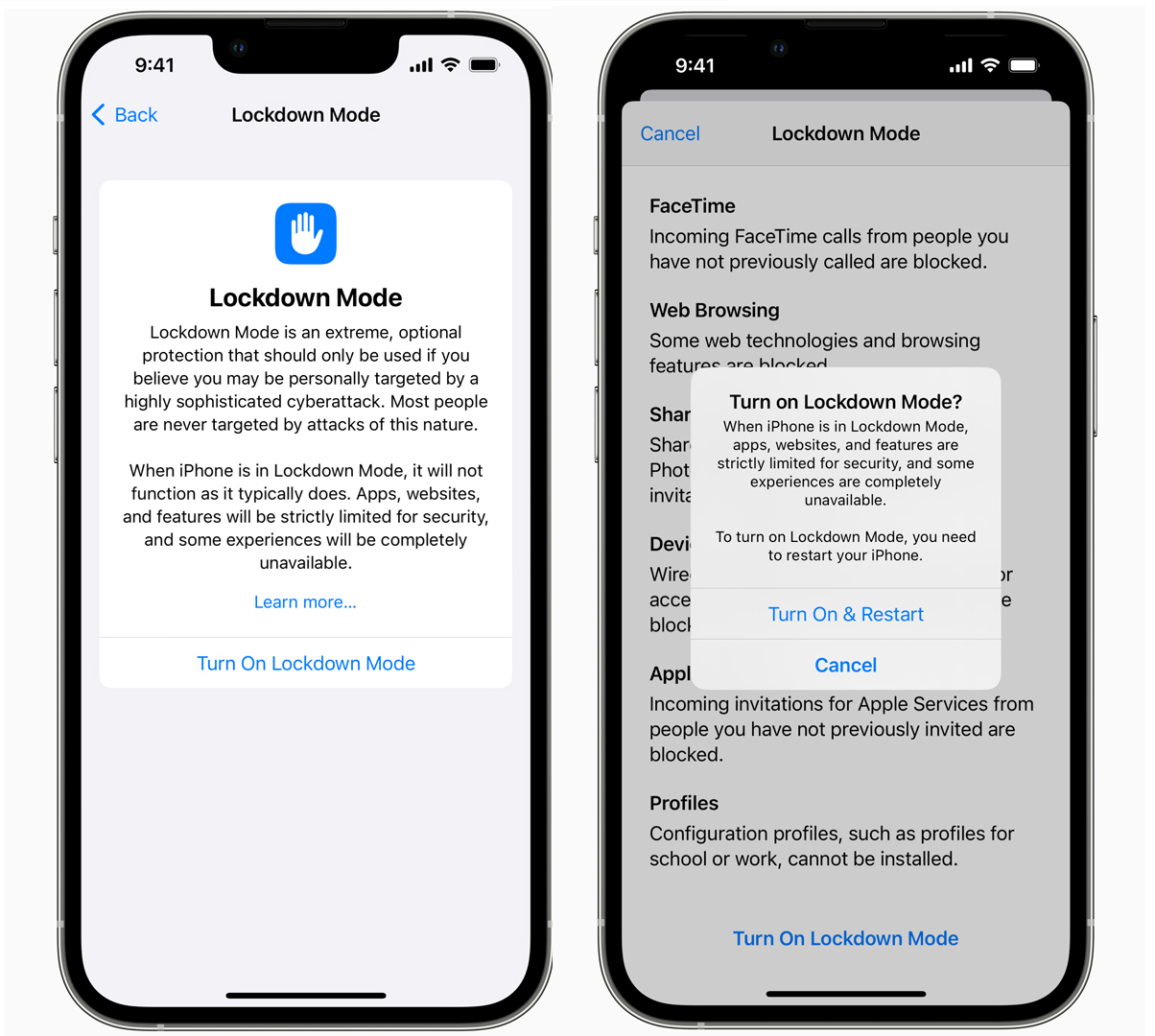
Lockdown Mode is Apple's new hardcore approach to security that, when enabled on an iPhone, will introduce five key protections, any one of which might make your iPhone less useful and fun, but also, apparently, a whole lot more secure.
These protections include:
Most message attachment types other than images are blocked and link previews are disabled.
In Safari, some web technologies, including just-in-time (JIT) JavaScript compilation, are disabled. Though you can exclude a trusted site from Lockdown mode.
It disables or blocks some Apple services like requests for incoming FaceTime calls from unknown callers (ones where you haven't previously initiated a Facetime call)
Wired connections with a computer or accessory are blocked when iPhone is locked.
You can't install configuration profiles and won't be able to enroll the device in mobile device management (MDM) when Lockdown Mode is enabled.
Together, all of these could significantly reduce attack avenues on your iPhone, and on your iPad and Mac, if you enable it on those systems, too.
In a release on Lockdown Mode, Apple says adding all three platforms to the security matrix "further hardens device defenses and strictly limits certain functionalities, sharply reducing the attack surface that potentially could be exploited by highly targeted mercenary spyware."
While this level of restricted access would feel like overkill for the average consumer or business person, many folks will find this Lockdown Mode useful, including those whose phones are connected to a variety of apps, services, and contacts relating to government, law enforcement, infrastructure, human rights groups, and news reporting.
Apple has a target
Last year, Apple informed thousands of iPhone users, including government officials, that they'd been targeted by "state-sponsored attackers." In November 2021, Apple sued NSO, the company it believes was responsible for creating the surveillance software, a charge NSO has denied.
Apple is nonetheless tying this security initiative to that battle, noting that, in addition to Lockdown Mode -- which is clearly designed to harden the iPhone against possible NSO-like attacks -- it's making a $10 million grant (and adding any money it gets out of the NSO lawsuit) to The Dignity and Justice Fund.
In a press release announcing Lockdown Mode, Lori McGlinchey, the Ford Foundation’s director of its Technology and Society program, noted that global spyware targets "human rights defenders, journalists, and dissidents," and that her organization "is proud to support this extraordinary initiative to bolster civil society research and advocacy to resist mercenary spyware."
Apple iOS 16 Lockdown Mode(Image credit: Apple)
Lockdown Mode arrives as something of a surprise since it wasn't announced or even teased at WWDC 2022. Plus, it's the rare bit of Apple platform programming that intentionally lacks broad appeal.
Ivan Krstić, Apple’s head of Security Engineering and Architecture, noted in the release, “While the vast majority of users will never be the victims of highly targeted cyberattacks, we will work tirelessly to protect the small number of users who are."
For those working on the front line of human rights, Lockdown Mode might be a low-cost and efficient way of protecting their phones. It might also be a little too restrictive; there's a chance that it might be more effective in an official capacity.
Back in the day, government officials, including the US President, were handed specialized and highly-secure phones, though some reportedly kept using their personal iPhones. iOS 16 Lockdown Mode might be a way of giving officials their iPhone cake, while eating securely, too.
from TechRadar - All the latest technology news https://ift.tt/ftKPx1r
Apple announced its plan to release a new feature called Lockdown Mode this fall that aims to add a new layer of protection for human rights advocates, political dissidents and other targets of sophisticated hacking attacks. Lockdown Mode will come to Apple's iPhones, iPads and Macs this fall and turning it on will block most attachments sent to the iPhone's Messages ...
Sony is one of the few companies to sell OLED TVs along with LG, Panasonic, Vizio, and now Samsung. But just how good are Sony’s OLEDs? Good enough to regularly show up on our lists of the best OLED TVs and the best 4K TVs, alongside the top offerings from those other brands.
We’ve previously offered suggestions on ways to improve the picture quality of Sony TVs. That list covered the basic adjustments that you’d find on any Sony set, with advice on choosing the right picture preset (Cinema, in most cases), avoiding the light sensor and Eco modes, bypassing noise reduction, and choosing the correct motion processing option. Most important, it warned of the perils of selecting the Vivid picture preset – a general rule that should apply to any TV.
Having just reviewed Sony’s new A80K OLED TV and spent additional quality viewing time with it, I wanted to circle back and offer specific suggestions for adjusting Sony’s OLED TVs to optimize their picture quality. This list will take a deeper-dive into some of the unique picture adjustment options found on the company’s OLEDs. Following it, you’ll get a sense of which menu options – some of which are named in a confusing manner – are important, and which ones you can leave on auto-pilot.
If you do own a Sony OLED TV, it’s a fair bet you dropped a good chunk of change on it. Here’s how to dig into your set’s picture menu and adjust it for best performance.
1. Select the right video signal settings
Okay, first off, what are video signal adjustments, and why do they get their own sub-menu on Sony’s OLED TVs? These settings apply to incoming signals, and they make general changes based on whether the signal is in 4K format with high dynamic range or in regular old high-definition.
If you’re using a 4K/HDR source like an external streamer or Ultra HD Blu-ray player, or just streaming in 4K/HDR using the set’s built-in apps, you can simply leave most of these settings (HDR mode, HDMI video range, and Color Space) in the Auto mode. That way, the TV will automatically adapt for incoming 4K/HDR and regular HD sources and display them correctly. The Advanced Color Adjustments in this menu are meant mainly for use by professional TV calibrators, and are something most viewers won’t need to play with (and probably shouldn’t).
2. Make the right brightness adjustments
Sony bunches numerous important settings in its picture Brightness sub-menu. There is, of course, a Brightness setting that will adjust the set’s overall screen brightness, but that’s just the start.
One key setting in this menu is HDR Tone Mapping. If you’re watching 4K/HDR programs, you’ll definitely want this turned on since it will optimize the contrast range of movies and TV shows with varying overall brightness levels. The Sony A80K model we tested has lower light output than some other OLED TVs, so this setting proved to be particularly important for conveying punchy highlights in 4K/HDR programs. Two related settings, Gradation Preferred and Brightness Preferred, are available for HDR Tone Mapping, but we didn’t note much of a difference between them.
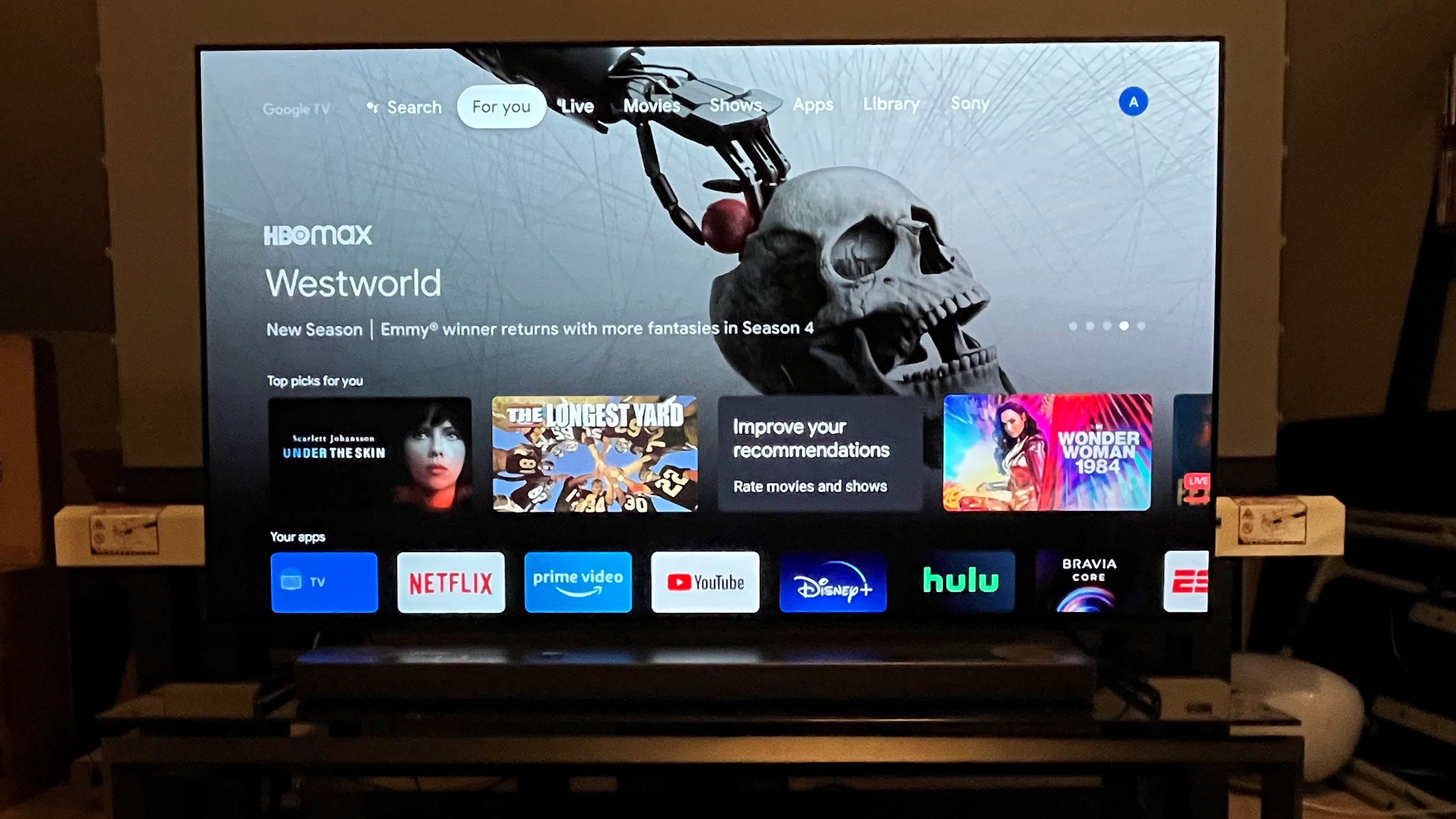
With some care, Sony's OLED TVs can make shows and movies streamed from HBO Max and other services look fantastic,(Image credit: Future)
3. Use the black level setting to adjust black
While this might seem like a completely obvious point, most viewers use their TV’s Brightness setting to adjust the level where absolute black sits in images. But Sony OLED TVs have a separate setting called Black Level (also in the Brightness sub-menu) that should instead be used to make that adjustment. Once we made this discovery and applied it, shadows on Sony’s OLED looked considerably deeper, and that gave the overall picture a higher level of contrast.
4. Don’t overlook peak luminance
The Peak Luminance setting, here again nestled in the Brightness sub-menu, proved very important for making 4K/HDR pictures look their best on Sony’s OLED TV, especially with dark movies. The results you’ll get will vary depending on the specific show or movie you are watching but, similar to the Black Level adjustment, it can affect the overall contrast of pictures. We’d suggest starting at the Medium setting and adjusting to taste. And if you’re the type who prefers to not regularly tweak your TV’s picture settings, you can simply leave it set at Medium.
5. Use reality creation – sparingly
Sony TVs have seemingly forever included a picture adjustment called Reality Creation (in the Clarity sub-menu). And while 4K images look plenty real already without any additional processing needed, you can use these adjustments to give pictures a slightly more detailed appearance. (As long as you don’t go overboard, in which case they’ll end up looking too-crisp and unnatural.)
Another important adjustment in the Clarity sub-menu is Smooth Gradation. This can help to eliminate the “banding” artifacts that are sometimes be seen in regular HD images, and which usually show up as rough-looking patches of color in background elements of pictures such as a clear blue sky.
from TechRadar - All the latest technology news https://ift.tt/6DbjkRa
Researchers have discovered a new malware sample capable of hiding from more than 50 antivirus products available on the market right now.
The malware was discovered by cybersecurity researchers from Unit 42, the threat intelligence team at Palo Alto Networks. The team first spotted the strain in May, when it discovered that it was built using the Brute Ratel (BRC4) tool.
BRC4’s developers claim to have even reverse-engineered popular antivirus products, to make sure their tool avoids detection.
The quality of the design and the speed at which it was distributed between the victims' endpoints has convinced the researchers that a state-sponsored actor is behind the campaign.
Russian methods
While the tool itself is dangerous, the researchers were more interested in its distribution path, which indicates a state-sponsored actor is in play.
The malware is being distributed in the form of a fake CV document. The CV is an ISO file that, once mounted onto a virtual drive, displays something resembling a Microsoft Word document.
While the researchers still can’t pinpoint exactly who the threat actor behind BRC4 is, they suspect Russian-based APT29 (AKA Cozy Bear), which has used weaponized ISOs in the past.
Another hint suggesting that a state-sponsored actor is in play is the speed at which BRC4 was leveraged. The ISO was created the same day the latest version of BRC4 was published.
"The analysis of the two samples described in this blog, as well as the advanced tradecraft used to package these payloads, make it clear that malicious cyber actors have begun to adopt this capability," Unit 42 wrote in a blog post.
"We believe it is imperative that all security vendors create protections to detect BRC4 and that all organizations take proactive measures to defend against this tool."